Showing posts with label Boo. Show all posts

Saturday, September 14, 2013

Arrays and Indexers in Boo


Today's post is about Arrays and Indexers in Boo. Here below you will find a very easy to follow program, that demonstrate arrays and indexer, by implementing some simple tasks that will make you grasp the idea of those 2 features real quick. The main goal of this post, is not really teaching arrays because, come on, you probably already know "all" about them, in fact, it is more to show you how you do that in Boo, in this case, compared to all other 22 languages on future posts, which essentially, is the real aim behind this blog.

By the way, if you missed my most recent post, "New Series - Arrays and Indexers", check it out. It has more details about the following program, and a bunch of definitions for the concepts used on this, and the following, posts. Or you can check my previous posts about arrays in C# and C++ just to compare.

I encourage you to copy the code below and try it yourself, normally, all programs you find in this blog are source code complete, just paste it on your IDE and run it.

There is room for improvement of the code, using generics is one example, but Generics, Collections, lambdas, etc. will have their own "series" of posts.


namespace BooArrays
# python's import syntax supported only on latest Boo version (2.0.9.5 assemblies)
from System import Random
from System.Text import StringBuilder
from System.Console import WriteLine, Write, ReadKey
from System.Convert import ToChar 
from System.Char import ToUpper

# Console Program
public def Main(argv as (string)): 
 # Single-dimensional Array(s)
 printtitle('Reverse Array Elements');
 
 # Declare and initialize Array of Chars
 # Boo doesn't support yet (version 2.0.9.5 assemblies) Char literals.
 # 1 character literal such as 'A' or "A" are strings
 # so, I'm converting Convert.ToChar before assignment by element.
 # There are 2 ways to initialize inline. i.e.
 # option 1: a as (char) = (ToChar('A'), ToChar('B'), ToChar('C'))
 # option 2: a as (char) = "ABC".ToCharArray()
 letters as (char) = array(char, 5)
 letters[0] = ToChar('A')
 letters[1] = ToChar('E')
 letters[2] = ToChar('I')
 letters[3] = ToChar('O')
 letters[4] = ToChar('U')
 
 printarraychar(letters)
 inverse_letters as (char) = reversechar(letters)
 printarraychar(inverse_letters)
 
 printtitle('Sort Integer Array Elements')
 
 # Declare and Initialize Array of Integers
 numbers as (int) = (10, 8, 3, 1, 5) 
 printarrayint(numbers)
 ordered_numbers as (int) = bubblesortint(numbers)
 printarrayint(ordered_numbers)
  
 printtitle('Sort String Array Elements')
 
 # Declare and Initialize and Array of Strings
 names as (string) = (
        'Damian', 
        'Rogelio', 
        'Carlos', 
        'Luis', 
        'Daniel'
    )
 printarraystring(names)
 ordered_names as (string) = bubblesortstring(names)
 printarraystring(ordered_names)
 
 # Multi-dimensional Array (Matrix row,column)
 printtitle('Transpose Matrix')
 
 /* Matrix row=2,col=3  
 * A =  [6  4 24]  
 *   [1 -9  8]  
 */ 
 matrx as (int, 2) = matrix(int, 2, 3) 
 # or alternative syntax: = matrix of int(2, 3)
 matrx[0,0] = 6
 matrx[0,1] = 4
 matrx[0,2] = 24
 matrx[1,0] = 1
 matrx[1,1] = -9
 matrx[1,2] = 8
 
 printmatrix(matrx)
 transposed_matrix as (int, 2) = transposematrix(matrx)
 printmatrix(transposed_matrix)
 
 # Jagged Array (Array-of-Arrays)
 printtitle('Upper Case Random Array & Graph Number of Elements')
 
 /*              
 * Creating an array of string arrays using the String.Split method 
 * instead of initializing it manually as follows: 
 *  
 * text as ((string)) = (  
 *      ( 'word1', 'word2', 'wordN' ),  
 *      ( 'word1', 'word2', 'wordM' ),  
 *      ... 
 *      } 
 *  
 * Text extract from: "El ingenioso hidalgo don Quijote de la Mancha" 
 *  
 */
 text as ((string)) = (
    'Hoy es el día más hermoso de nuestra vida, querido Sancho;'.Split(ToChar(' ')), 
    'los obstáculos más grandes, nuestras propias indecisiones;'.Split(ToChar(' ')), 
    'nuestro enemigo más fuerte, miedo al poderoso y nosotros mismos;'.Split(ToChar(' ')), 
    'la cosa más fácil, equivocarnos;'.Split(ToChar(' ')), 
    'la más destructiva, la mentira y el egoísmo;'.Split(ToChar(' ')), 
    'la peor derrota, el desaliento;'.Split(ToChar(' ')), 
    'los defectos más peligrosos, la soberbia y el rencor;'.Split(ToChar(' ')), 
    'las sensaciones más gratas, la buena conciencia...'.Split(ToChar(' ')))
 
 printjaggedarray(text)
 uppercaserandomarray(text)
 printjaggedarray(text)
 graphjaggedarray(text)
 
 # Array Exceptions
 printtitle('Common Array Exceptions')

 printcommonarrayexceptions(null)
 printcommonarrayexceptions(text)
 
 # Accessing Class Array Elements through Indexer    
 printtitle('Alphabets')

 vowels as Alphabet = Alphabet(5)
 vowels[0] = ToChar('a')
 vowels[1] = ToChar('e')
 vowels[2] = ToChar('i')
 vowels[3] = ToChar('o')
 vowels[4] = ToChar('u')
 
 print '\nVowels = {' + join((vowels[0], vowels[1], vowels[2], 
                        vowels[3], vowels[4]), ',') + '}'
 
 en as Alphabet = Alphabet('abcdefghijklmnopqrstuvwxyz')
 print "English Alphabet = {${en.ToString()}}"
 
 print "Alphabet Extract en[9..19] = {${Alphabet(en.slice(9, 10))}}"
 
 word1 as string = join((en[6], en[14], en[14], en[3]), '')
 word2 as string = join((en[1], en[24], en[4]), '')
 word3 as string = join((en[4], en[21], en[4], en[17], en[24], 
                            en[14], en[13], en[4]), '')
 print "\n$word1 $word2, $word3!\n"
 
 ReadKey()

def reversechar(arr as (char)) as (char): 
 reversed as (char) = array(char, arr.Length)
 i as int = 0
 for j in range(len(arr) - 1, -1, -1):
  reversed[i] = arr[j]
  i++
 return reversed

def bubblesortint(arr as (int)) as (int):
 swap as int = 0
 for i in range(len(arr) - 1, -1, -1):
  for j in range(0, len(arr) - 1):
   if arr[j] > arr[j + 1]:
    swap = arr[j]
    arr[j] = arr[j + 1]
    arr[j + 1] = swap
 return arr

def bubblesortstring(arr as (string)) as (string):
 swap as string = ''
 for i in range(len(arr) - 1, -1, -1):
  for j in range(0, len(arr) - 1):
   if arr[j][0] > arr[j + 1][0]:
    swap = arr[j]
    arr[j] = arr[j + 1]
    arr[j + 1] = swap
 return arr

def transposematrix(m as (int, 2)) as (int, 2):
 /* Transposing a Matrix 2,3
 *
 * A =  [6  4 24]T [ 6  1]
 *    [1 -9  8]  [ 4 -9]
 *      [24  8]
 */
 transposed as (int, 2) = matrix(int, len(m, 1), len(m, 0))
 for i in range(len(m, 0)):
  for j in range(len(m, 1)):
   transposed[j, i] = m[i, j]
 return transposed

def uppercaserandomarray(arr as ((string))) as void:
 r as Random = Random()
 i as int = r.Next(len(arr))
 for j as int in range(len(arr[i])):    
  arr[i][j] = arr[i][j].ToUpper()
  
def printarraychar(arr as (char)) as void:
 print '\nPrint Array Content ' + arr.GetType().Name.Replace(']', len
(arr).ToString() + ']') 
 for i in range(len(arr)):
  WriteLine(' array [{0,2}] = {1,2} ', i, arr[i])
  
def printarrayint(arr as (int)):
 print '\nPrint Array Content ' + arr.GetType().Name.Replace(']', len
(arr).ToString() + ']') 
 for i in range(len(arr)):
  WriteLine(' array [{0,2}] = {1,2} ', i, arr[i])

def printarraystring(arr as (string)) as void:
 print '\nPrint Array Content ' + arr.GetType().Name.Replace(']', len

(arr).ToString() + ']') 
 for i in range(len(arr)):
  WriteLine(' array [{0,2}] = {1,2} ', i, arr[i])

def printmatrix(m as (int, 2)) as void:
 print '\nPrint Matrix Content ' + m.GetType().Name.Replace('[,]', '') + '[' + len

(m,0).ToString() + ',' + len(m,1).ToString() + ']' 
 for i in range(len(m, 0)):
  for j in range(len(m, 1)):
   WriteLine(' array [{0,2},{1,2}] = {2,2} ', i, j, m[i, j])

def graphjaggedarray(arr as ((string))) as void:
 /* When using Arrays, we can use for(each) instead of for by index:        
  *   
  * for s as (string) in arr:
  *   for w as string in s:
  *   
 */
 print "\nPrint Text Content ${arr.GetType().Name}"
  for i as int in range(len(arr)):
   Write('Line{0,2}|', i+1)
   for j as int in range(len(arr[i])):
    Write('{0,3}', '*')
   print " (${len(arr[i]).ToString()})"

def printjaggedarray(arr as ((string))) as void:
 line as StringBuilder    
 print "\nPrint Jagged Array Content ${arr.GetType().Name}"
 for i as int in range(len(arr)):  
  line = StringBuilder()
  for j in range(len(arr[i])):   
   line.Append(' ' + arr[i][j])   
  if line.ToString() == line.ToString().ToUpper():
   line.Append(' <-- [UPPERCASED]')
  print line

def printcommonarrayexceptions(arr as ((string))) as void:
 try: 
  arr[100][100] = 'hola'  
 except ex as System.Exception:    
  print "\nException: \n${ex.GetType().Name}\n${ex.Message}"

def printtitle(message as string) as void: 
 print ''
 print('=' * 54)
 print message
 print('=' * 54)

[System.Reflection.DefaultMember("item")]
class Alphabet: 
 # Array Field
 private letters as (char)
 
 # Indexer Get/Set Property
 public item[index as int]:
  get:
   rawArrayIndexing:
    return letters[index]
  set:
   rawArrayIndexing:
    letters[index] = ToUpper(value)
 # Read-Only Property
 public Length as int:    
  get:
   return len(self.letters) 

 # Constructors
 public def constructor(size as int):
  self.letters = array(char, size)
 
 public def constructor(list as string):
  self.letters = list.ToUpper().ToCharArray()

 public def constructor(list as (char)):
  self.letters = list

 # Overridden Method 
 public override def ToString():
  return join(self.letters, ',')

 # Method
 public def slice(start as int, length as int) as (char):
  # using Boo's slicing: 
  # container[<firstIndexWanted>:<firstIndexNotWanted>:<step>]
  return self.letters[start:start+length]


The output:


Voilà, that's it. Next post in the following days.

Tuesday, March 8, 2011

Factorial and Fibonacci in Boo


Here below a little program in Boo that implements 2 classes (in fact, they are 3). There is the main class, called Fiborial (Fibo(nnacci)+(Facto)rial) that implements the Fibonacci and the Factorial algorithms in two ways, one Recursive (using recursion) and the other Imperative (using loops and states). The second class is just an instance class that does the same thing, but its there just to show the difference between static and instance classes, and finally the third one (which will not appear in other languages) is the Program class which has the static execution method "Main".

You can also find 3 more little examples at the bottom. One prints out the Factorial's Series and Fibonacci's Series, the second one just shows a class that mixes both: static and instance members, and finally the third one that uses different return types (including System.Numerics.BigInteger) for the Factorial method to compare the timing and result.

As with the previous posts, you can copy and paste the code below in your favorite IDE/Editor and start playing and learning with it. This little "working" program will teach you some more basics of the Programming Language.

There are some "comments" on the code added just to tell you what are or how are some features called. In case you want to review the theory, you can read my previous post, where I give a definition of each of the concepts mentioned on the code. You can find it here: http://carlosqt.blogspot.com/2011/01/new-series-factorial-and-fibonacci.html 


The Fiborial Program

// Factorial and Fibonacci in Boo
namespace FiborialBoo
import System
import System.Collections.Generic
import System.Diagnostics
import System.Numerics

// Static Class  
public static class StaticFiborial:
    // Static Field
    private className as string
    // Static Constructor
    def constructor():
        className = "Static Constructor"
        print className
    // Static Method - Factorial Recursive  
    public def FactorialR(n as int) as BigInteger:
        if n == 1:
            return 1  
        else:  
            return n * FactorialR(n - 1)
    // Static Method - Factorial Imperative  
    public def FactorialI(n as int) as BigInteger:
        res as BigInteger = 1
        for i as int in range(n, 1):
            res *= i
        return res
    // Static Method - Fibonacci Recursive  
    public def FibonacciR(n as int) as long:
        if n < 2:
            return 1  
        else:  
            return FibonacciR(n - 1) + FibonacciR(n - 2)
    // Static Method - Fibonacci Imperative
    public def FibonacciI(n as int) as long:
        pre as long = 1
        cur as long = 1
        tmp as long = 0
        for i as int in range(2, n+1):
            tmp = cur + pre
            pre = cur
            cur = tmp
        return cur
    // Static Method - Benchmarking Algorithms
    public def BenchmarkAlgorithm(algorithm as int, values as List[of int]) as void:
        timer as Stopwatch = Stopwatch()
        i as int = 0
        testValue as int = 0
        facTimeResult as BigInteger = 0
        fibTimeResult as long = 0  
        
        // "if-elif-else" Flow Control Statement  
        if algorithm == 1:
            print "\nFactorial Imperative:"
            // "For in range" Loop Statement 
            for i in range(values.Count):                
                testValue = values[i]
                // Taking Time  
                timer.Start()
                facTimeResult = FactorialI(testValue)
                timer.Stop()                          
                // Getting Time  
                print " (${testValue}) = ${timer.Elapsed}"
        elif algorithm == 2:
            print "\nFactorial Recursive:"
            // "While" Loop Statement
            while i < len(values):
                testValue = values[i]
                // Taking Time  
                timer.Start()
                facTimeResult = FactorialR(testValue)
                timer.Stop()                          
                // Getting Time  
                print " (${testValue}) = ${timer.Elapsed}"
                i += 1
        elif algorithm == 3:
            print "\nFibonacci Imperative:" 
            // "For in List" Loop Statement             
            for item as int in values:
                testValue = item
                // Taking Time
                timer.Start()
                fibTimeResult = FibonacciI(testValue)
                timer.Stop()
                // Getting Time
                print " (${testValue}) = ${timer.Elapsed}"                
        elif algorithm == 4:
            print "\nFibonacci Recursive:"
            // "For in List" Loop Statement 
            for item as int in values:
                testValue = item
                // Taking Time
                timer.Start()
                fibTimeResult = FibonacciR(testValue)
                timer.Stop()
                // Getting Time
                print " (${testValue}) = ${timer.Elapsed}"
        else:
            print "DONG!"

// Instance Class
public class InstanceFiborial:
    // Instances Field
    private className as string
    // Instance Constructor
    def constructor():
        self.className = "Instance Constructor"
        print self.className
    // Instance Method - Factorial Recursive
    public def FactorialR(n as int) as BigInteger:
        // Calling Static Method
        return StaticFiborial.FactorialR(n)
    // Instance Method - Factorial Imperative
    public def FactorialI(n as int) as BigInteger:
        // Calling Static Method
        return StaticFiborial.FactorialI(n)
    // Instance Method - Fibonacci Recursive  
    public def FibonacciR(n as int) as long:
        // Calling Static Method
        return StaticFiborial.FibonacciR(n)
    // Instance Method - Fibonacci Imperative
    public def FibonacciI(n as int) as long:
        // Calling Static Method
        return StaticFiborial.FibonacciI(n)

public def Main(argv as (string)):
    print "\nStatic Class"
    // Calling Static Class and Methods
    // No instantiation needed. Calling method directly from the class
    print "FacImp(5) = ${StaticFiborial.FactorialI(5)}"
    print "FacRec(5) = ${StaticFiborial.FactorialR(5)}"
    print "FibImp(11)= ${StaticFiborial.FibonacciI(11)}"
    print "FibRec(11)= ${StaticFiborial.FibonacciR(11)}"

    print "\nInstance Class"
    // Calling Instance Class and Methods
    // Need to instantiate before using. Calling method from instantiated object
    ff as InstanceFiborial = InstanceFiborial()
    print "FacImp(5) = ${ff.FactorialI(5)}"
    print "FacRec(5) = ${ff.FactorialR(5)}"
    print "FibImp(11)= ${ff.FibonacciI(11)}"
    print "FibRec(11)= ${ff.FibonacciR(11)}"

    // Create a (Boo) list of values to test  
    // From 5 to 50 by 5
    values as List[of int] = List[of int]()
    for i as int in range(5,55,5):
        values.Add(i)
    
    // Benchmarking Fibonacci
    // 1 = Factorial Imperative
    StaticFiborial.BenchmarkAlgorithm(1, values)
    // 2 = Factorial Recursive
    StaticFiborial.BenchmarkAlgorithm(2, values)
    // Benchmarking Factorial
    // 3 = Fibonacci Imperative
    StaticFiborial.BenchmarkAlgorithm(3, values)
    // 4 = Fibonacci Recursive
    StaticFiborial.BenchmarkAlgorithm(4, values)

    // Stop and Exit
    Console.ReadKey(true)

And the Output is:


Humm, looks like Fibonnaci's algorithm implemented using recursion is definitively more complex than the others 3 right? I will grab these results for this and each of the upcoming posts to prepare a comparison of time execution between all the programming languages, then we will be able to talk about the algorithm's complexity as well.

Printing the Factorial and Fibonacci Series
namespace FiborialSeries
import System
import System.Text
import System.Numerics

// Static Class  
public static class Fiborial:
    // Using a StringBuilder as a list of string elements  
    public def GetFactorialSeries(n as int) as string:  
        // Create the String that will hold the list  
        series as StringBuilder = StringBuilder() 
        // We begin by concatenating the number you want to calculate  
        // in the following format: "!# ="  
        series.Append("!")
        series.Append(n)
        series.Append(" = ")
        // We iterate backwards through the elements of the series  
        for i as int in range(n, 1):
            // and append it to the list  
            series.Append(i)
            if i > 1: 
                series.Append(" * ")  
            else:   
                series.Append(" = ")
        // Get the result from the Factorial Method  
        // and append it to the end of the list  
        series.Append(Factorial(n))
        // return the list as a string  
        return series.ToString()

    // Using a StringBuilder as a list of string elements  
    public def GetFibonnaciSeries(n as int) as string:
        // Create the String that will hold the list  
        series as StringBuilder = StringBuilder() 
        // We begin by concatenating the first 3 values which  
        // are always constant  
        series.Append("0, 1, 1")  
        // Then we calculate the Fibonacci of each element  
        // and add append it to the list  
        for i as int in range(2, n+1):
            if i < n:
                series.Append(", ") 
            else:
                series.Append(" = ")  
            series.Append(Fibonacci(i))
        // return the list as a string  
        return series.ToString()
        
    public def Factorial(n as int) as BigInteger:
        if n == 1:
            return 1  
        else:  
            return n * Factorial(n - 1)    
    
    public def Fibonacci(n as int) as long:
        if n < 2:
            return 1  
        else:  
            return Fibonacci(n - 1) + Fibonacci(n - 2)

public def Main(argv as (string)):
    // Printing Factorial Series  
    print ""
    print Fiborial.GetFactorialSeries(5)
    print Fiborial.GetFactorialSeries(7)
    print Fiborial.GetFactorialSeries(9)
    print Fiborial.GetFactorialSeries(11)
    print Fiborial.GetFactorialSeries(40)
    // Printing Fibonacci Series  
    print ""
    print Fiborial.GetFibonnaciSeries(5)
    print Fiborial.GetFibonnaciSeries(7)
    print Fiborial.GetFibonnaciSeries(9)
    print Fiborial.GetFibonnaciSeries(11)
    print Fiborial.GetFibonnaciSeries(40)
    
    Console.ReadKey(true)

And the Output is:


Mixing Instance and Static Members in the same Class

We can also define instance classes that have both, instance and static members such as: fields, properties, constructors, methods, etc. However, we cannot do that if the class is marked as static because of the features mentioned in the previous post:
The main features of a static class are:
  • They only contain static members.
  • They cannot be instantiated.
  • They are sealed.
  • They cannot contain Instance Constructors

namespace FiborialExtrasBoo2
import System

// Instance Classes can have both: static and instance members.   
// However, Static Classes only allow static members to be defined.  
// If you declare our next example class as static  
// (static class Fiborial) you will get the following compile error  
// Error: cannot declare instance members in a static class  
    
// Instance Class  
public class Fiborial:
    // Instance Field
    private instanceCount as int
    // Static Field
    private static staticCount as int
    // Instance Read-Only Property  
    // Within instance members, you can always use    
    // the "self" reference pointer to access your (instance) members.            
    public InstanceCount as int:
        get:
            return self.instanceCount  
    // Static Read-Only Property  
    // Remeber that Properties are Methods to the CLR, so, you can also  
    // define static properties for static fields.   
    // As with Static Methods, you cannot reference your class members  
    // with the "self" reference pointer since static members are not  
    // instantiated.          
    public static StaticCount as int:
        get:  
            return staticCount  
    // Instance Constructor  
    public def constructor():
        self.instanceCount = 0  
        print "\nInstance Constructor ${self.instanceCount}"
    // Static Constructor  
    private static def constructor():
        staticCount = 0  
        print "\nStatic Constructor ${staticCount}"
    // Instance Method
    public def Factorial(n as int) as void: 
        self.instanceCount += 1 
        print "\nFactorial(${n})" 
    // Static Method  
    public static def Fibonacci(n as int) as void: 
        staticCount += 1
        print "\nFibonacci(${n})" 

public def Main(argv as (string)):
    // Calling Static Constructor and Methods  
    // No need to instantiate  
    Fiborial.Fibonacci(5)
    
    // Calling Instance Constructor and Methods  
    // Instance required  
    fib as Fiborial = Fiborial()  
    fib.Factorial(5)
    
    Fiborial.Fibonacci(15)
    fib.Factorial(5)
    
    // Calling Instance Constructor and Methods  
    // for a second object  
    fib2 as Fiborial = Fiborial()
    fib2.Factorial(5)
    
    print ""
    // Calling Static Property  
    print "Static Count = ${Fiborial.StaticCount}"
    // Calling Instance Property of object 1 and 2  
    print "Instance 1 Count = ${fib.InstanceCount}"
    print "Instance 2 Count = ${fib2.InstanceCount}"
    Console.ReadKey(true)

And the Output is:


Factorial using System.Int64, System.Double, System.Numerics.BigInteger

The Factorial of numbers over 20 are massive!
For instance: !40 = 815915283247897734345611269596115894272000000000!
Because of this, the previous version of this program was giving the "wrong" result
!40 = -70609262346240000 when using "long" (System.Int64) type, but it was not until I did the Fiborial version in VB.NET that I realized about this faulty code, because instead of giving me a wrong value, VB.NET, JScript.NET, Boo execution thrown an Overflow Exception when using the "Long/long" (System.Int64) type.

My first idea was to use ulong and ULong, but both failed for "big" numbers. I then used Double (double floating point) type and got no more exception/wrong result. The result of the factorial was now correct !40 = 1.1962222086548E+56, but still I wanted to show the Integer value of it, so I did some research and found that there is a new System.Numerics.BigInteger class in the .NET Framework 4.0. Adding the reference to the project and using this new class as the return type of the Factorial methods, I was able to get the result I was expecting.
!40 = 815915283247897734345611269596115894272000000000

What I also found was that using different types change the time the algorithm takes to finish:
System.Int64 < System.Double < System.Numerics.BigInteger
Almost by double!

To illustrate what I just "tried" to say, lets have a look at the following code and the output we get.

namespace FiborialExtrasBoo3
import System
import System.Diagnostics
import System.Numerics

# Long Factorial
def FactorialInt64(n as int) as long:
    if n == 1:
        return 1
    else:
        return n * FactorialInt64(n - 1)
    
# Double/Number Factorial   
def FactorialDouble(n as int) as double:
    if n == 1:
        return 1
    else:
        return n * FactorialDouble(n - 1)
 
# BigInteger Factorial   
def FactorialBigInteger(n as int) as BigInteger:  
    if n == 1:
        return 1
    else:
        return n * FactorialBigInteger(n - 1)

public def Main(argv as (string)):
    timer as Stopwatch = Stopwatch()
    facIntResult as long = 0
    facDblResult as double = 0
    facBigResult as BigInteger = 0  
    i as int = 0
    
    print "\nFactorial using Int64"
    # Benchmark Factorial using Int64  
    # Overflow Exception!!!
    try:
        for i as int in range(5,55,5):
            timer.Start()
            facIntResult = FactorialInt64(i)
            timer.Stop()        
            print " (${i}) = ${timer.Elapsed} : ${facIntResult}"
    except ex as ArithmeticException:
        # yummy ^_^
        print "Oops! ${ex.Message} "
    
    print "\nFactorial using Double"
    # Benchmark Factorial using Double
    for i as int in range(5,55,5):
        timer.Start()
        facDblResult = FactorialDouble(i)
        timer.Stop()        
        print " (${i}) = ${timer.Elapsed} : ${facDblResult}"
    
    print "\nFactorial using BigInteger"
    # Benchmark Factorial using BigInteger
    for i as int in range(5,55,5):
        timer.Start()
        facBigResult = FactorialBigInteger(i)
        timer.Stop()        
        print " (${i}) = ${timer.Elapsed} : ${facBigResult}"
    
    Console.ReadKey(true)

NOTE: you need to manually add a reference to the System.Numerics.dll assembly to your project so you can add it to your code.

And the Output is:

Monday, September 13, 2010

Boo - Basics by Example


Continue with the Basics by Example; today's version of the post written in Boo Enjoy!

You can copy and paste the code below in your favorite IDE/Editor and start playing and learning with it. This little "working" program will teach you the basics of the Programming Language.

There are some "comments" on the code added just to tell you what are or how are some features called. In case you want to review the theory, you can read my previous post, where I give a definition of each of the concepts mentioned on the code. You can find it here: http://carlosqt.blogspot.com/2010/08/new-series-languages-basics-by-example.html 


Greetings Program - Verbose
// Boo Basics  
namespace BooGreetProgram  
import System  
  
private class Greet:  
    // Fields or Attributes  
    private message as string  
    private name as string  
    private loopMessage as int  
    // Properties  
    public Message as string:  
        get:      
            return self.message  
        set:  
            self.message = self.Capitalize(value)  
    public Name as string:  
        get:  
            return self.name  
        set:  
            self.name = self.Capitalize(value)  
    public LoopMessage as int:  
        get:  
            return self.loopMessage  
        set:  
            self.loopMessage = value  
    // Constructor  
    public def constructor():  
        self.message = ""  
        self.name = ""  
        self.loopMessage = 0  
    // Overloaded Constructor  
    public def constructor(message as string, name as string, loopMessage as int):  
        self.message = self.Capitalize(message)  
        self.name = self.Capitalize(name)  
        self.loopMessage = loopMessage  
    // Method 1  
    private def Capitalize(val as string) as string:  
        // "if-then-else" statement  
        if val.Length >= 1:  
            return val[0].ToString().ToUpper() + val.Substring(1, val.Length - 1)    
        else:  
            return ""  
    // Method 2  
    public def Salute() as void:  
        // "for" statement  
        for i as int in range(0, self.loopMessage):  
            print "${self.message} ${self.name}!"   
    // Overloaded Method 2.1  
    public def Salute(mesage as string, name as string, loopMessage as int) as void:  
        // "while" statement  
        i as int = 0  
        while i < loopMessage:  
            print "${self.Capitalize(message)} ${self.Capitalize(name)}!"   
            i++  
    // Overloaded Method 2.2  
    public def Salute(name as string) as void:  
        // "switch/case" statement is not supported    
        // so I'm using if then else if...    
        dtNow as DateTime = DateTime.Now    
        hh as int = dtNow.Hour  
        if hh==6 or hh==7 or hh==8 or hh==9 or hh==10 or hh==11:  
            self.message = "good morning,"  
        elif hh == 12 or hh == 13 or hh == 14 or hh == 15 or hh == 16 or hh == 17:  
            self.message = "good evening,"  
        elif hh == 23 or hh == 0 or hh == 1 or hh == 2 or hh == 3 or hh == 4 or hh == 5:  
            self.message = "good night,"  
        else:  
            self.message = "huh?"  
        print "${self.Capitalize(self.message)} ${self.Capitalize(name)}!"   

// Console Program  
public def Main(argv as (string)):    
    // Define variable object of type Greet  
    g as Greet  
    // Instantiate Greet. Call Constructor    
    g = Greet()      
    // Call Set Properties    
    g.Message = "hello"  
    g.Name = "world"  
    g.LoopMessage = 5  
    // Call Method 2  
    g.Salute()  
    // Call Overloaded Method 2.1 and Get Properties  
    g.Salute(g.Message, "boo", g.LoopMessage)  
    // Call Overloaded Method 2.2  
    g.Salute("carlos")  
    // Stop and exit  
    print "Press any key to exit..."  
    Console.ReadKey()

Greetings Program - Minimal
// Boo Basics  
import System  

class Greet:  
    // Fields or Attributes  
    message as string  
    name as string  
    loopMessage as int  
    // Properties  
    Message as string:  
        get:  
            return message  
        set:  
            message = Capitalize(value)  
    Name as string:  
        get:  
            return name  
        set:  
            name = Capitalize(value)  
    LoopMessage as int:  
        get:  
            return loopMessage  
        set:  
            loopMessage = value  
    // Constructor  
    def constructor():  
        message = ""  
        name = ""  
        loopMessage = 0  
    // Overloaded Constructor  
    def constructor(message as string, name as string, loopMessage as int):  
        self.message = Capitalize(message)  
        self.name = Capitalize(name)  
        self.loopMessage = loopMessage  
    // Method 1  
    private def Capitalize(val as string) as string:  
        // "if-then-else" statement  
        if val.Length >= 1:
            return val[0].ToString().ToUpper() + val.Substring(1, val.Length - 1)    
        else:  
            return ""  
    // Method 2  
    def Salute():  
        // "for" statement  
        for i as int in range(0, self.loopMessage):  
            print "${message} ${name}!"   
        // Overloaded Method 2.1  
    def Salute(mesage as string, name as string, loopMessage as int):  
        // "while" statement  
        i = 0  
        while i < loopMessage:  
            print "${Capitalize(message)} ${Capitalize(name)}!"   
            i++  
    // Overloaded Method 2.2  
    def Salute(name as string):  
        // "switch/case" statement is not supported    
        // so I'm using if then else if...    
        dtNow = DateTime.Now    
        hh as int = dtNow.Hour  
        if hh==6 or hh==7 or hh==8 or hh==9 or hh==10 or hh==11:  
            message = "good morning,"  
        elif hh == 12 or hh == 13 or hh == 14 or hh == 15 or hh == 16 or hh == 17:  
            message = "good evening,"  
        elif hh == 23 or hh == 0 or hh == 1 or hh == 2 or hh == 3 or hh == 4 or hh == 5:  
            message = "good night,"  
        else:  
            message = "huh?"  
        print "${Capitalize(message)} ${Capitalize(name)}!"   

// Console Program  
// Define variable object of type Greet and Instantiate Greet. Call Constructor    
g = Greet()      
// Call Set Properties  
g.Message = "hello"  
g.Name = "world"  
g.LoopMessage = 5  
// Call Method 2  
g.Salute()  
// Call Overloaded Method 2.1 and Get Properties  
g.Salute(g.Message, "boo", g.LoopMessage)  
// Call Overloaded Method 2.2  
g.Salute("carlos")  
// Stop and exit  
print "Press any key to exit..."  
Console.ReadKey()


And the Output is:


Auto-Implemented Properties in Boo

Auto-implemented properties enable you to quickly specify a property of a class without having to write code to Get and Set the property. The following code shows how to use them just like with VB.NET, C#, C++/CLI and so on.

//That means that we can omit the Fields/Attributes declaration  
//and go directly to the properties  
class Greet:
 // Fields or Attributes 
 //message as string 
 //name as string
 //loopMessage as int
 // Properties     
 [Property(Message)]
 message as string
 [Property(Name)]
 name as string
 [Property(LoopMessage)]
 loopMessage as int

// then, when ever you want to use them you get and set their value using the  properties or using the auto-generated attributes (different from C# where you need to use the property) 
// Let's see an example in our parameter-less constructor 

 // Constructor
 def constructor():
  self.Message = ""
  self.Name = ""
  self.LoopMessage = 0
        // or
  self.message = ""
  self.name = ""
  self.loopMessage = 0

Saturday, June 19, 2010

OO Hello World - Boo


Hello world in Boo is here as well.
"Boo is a new object oriented statically typed programming language for the Common Language Infrastructure with a python inspired syntax and a special focus on language and compiler extensibility." Taken from: (http://boo.codehaus.org/)


By the way, you can see my previous post here: http://carlosqt.blogspot.com/2010/06/oo-hello-world.html
where I give some details on WHY these "OO Hello World series" samples.


Version 1 (Minimal):
The minimum you need to type to get your program compiled and running.
class Greet: 
 name as string
 def constructor(name as string):
  self.name = name[0].ToString().ToUpper() + name.Substring(1, name.Length - 1)
 def Salute():
  print "Hello, ${name}!"

// Greet the world!
g = Greet("world")
g.Salute()
Version 2 (Verbose):
Explicitly adding instructions and keywords that are optional to the compiler.
namespace GreetProgram
import System

private class Greet: 
 private name as string
 public def constructor(name as string):
  self.name = name[0].ToString().ToUpper() + name.Substring(1, name.Length - 1)
 public def Salute():
  print "Hello, ${self.name}!"

// Greet the world!
public def Main(argv as (string)):
 g = Greet("world")
 g.Salute()


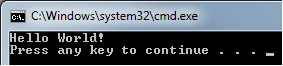
The Program Output:


Boo Info:
Boo is an object oriented, statically typed programming language that seeks to make use of the Common Language Infrastructure's support for Unicode, internationalization and web applications, while using a Python-inspired syntax[1] and a special focus on language and compiler extensibility. Some features of note include type inference, generators, multimethods, optional duck typing, macros, true closures, currying, and first-class functions.” Taken from: (http://en.wikipedia.org/wiki/Boo_(programming_language))

Appeared:
2003
Current Version:
Developed by:
Rodrigo B. De Oliveira
Creator:
Rodrigo B. De Oliveira
Influenced by:
Python (Guido van Rossum)
Predecessor Language
Predecessor Appeared
Predecessor Creator
Runtime Target:
CLR
Latest Framework Target:
3.5
Mono Target:
Yes
Allows Unmanaged Code:
Yes
Source Code Extension:
“.boo”
Keywords:
66
Case Sensitive:
Yes
Free Version Available:
Yes
Open Source:
Yes
Standard:
No
Latest IDE Support:
SharpDevelop 3.2/4.0 (beta)
MonoDevelop 2.2
Language Reference:
Extra Info: