Showing posts with label Python. Show all posts

Thursday, July 24, 2014

Arrays and Indexers in Jython


Today's post is about Arrays and Indexers in Jython. Here below you will find a very easy to follow program, that demonstrate arrays and indexer, by implementing some simple tasks that will make you grasp the idea of those 2 features real quick. The main goal of this post, is not really teaching arrays because, come on, you probably already know "all" about them, in fact, it is more to show you how you do that in Jython, in this case, compared to all other 22 languages on future posts, which essentially, is the real aim behind this blog.

This is the second post of a dynamic language. As with IronPython's version of the program, code structure changed slightly from previous posts. Besides that, because you normally don't use Arrays per se in Python (except for numerical arrays when better performance is required), it is more practical to use Python's List object instead of Java's java.lang.ArrayList, which can definitely be used in Jython, specially when you need to inter operate with other JVM languages.
By the way, if you missed my most recent post, "New Series - Arrays and Indexers", check it out. It has more details about the following program, and a bunch of definitions for the concepts used on this, and the following, posts. Or you can check my previous posts about arrays in Boo (or Cobra or Jython later on) just to compare.

I encourage you to copy the code below and try it yourself, normally, all programs you find in this blog are source code complete, just paste it on your IDE and run it.

There is room for improvement of the code, using generics is one example, but Generics, Collections, lambdas, etc. will have their own "series" of posts.


import java  
from java.util import Random

# Console Program     
def main():     
    # Single-dimensional Array(s)     
    printtitle('Reverse Array Elements')   
  
    # Declare and Initialize Array (Python List) of Chars     
    # or letters = list('AEIOU')  
    # or letters = 5 * [' ']        
    letters = list(' ' * 5) # letters = []  
    letters[0] = 'A'        # letters.append('A')  
    letters[1] = 'E'        # letters.append('E')  
    letters[2] = 'I'        # letters.append('I')  
    letters[3] = 'O'        # letters.append('O')  
    letters[4] = 'U'        # letters.append('U')  
      
    printarray(letters)  
    inverse_letters = reversechar(letters)  
    printarray(inverse_letters)  
  
    printtitle('Sort Integer Array Elements')  
    # Declare and Initialize Array of Integers     
    numbers = [10, 8, 3, 1, 5]  
      
    printarray(numbers)     
    ordered_numbers = bubblesort(numbers)     
    printarray(ordered_numbers)  
  
    printtitle('Sort String Array Elements')    
  
    # Declare and Initialize and Array of Strings     
    names = ['Damian', 'Rogelio', 'Carlos', 'Luis', 'Daniel']  
  
    printarray(names)     
    ordered_names = bubblesort(names)     
    printarray(ordered_names)  
  
    # Multi-dimensional Array (Matrix row,column)     
    printtitle('Transpose Matrix')     
  
    matrix = [[6, 4, 24],        
              [1, -9, 8]]  
  
    printmatrix(matrix)  
    transposed_matrix = transposematrix(matrix)     
    printmatrix(transposed_matrix)    
  
    # Jagged Array (Array-of-Arrays)     
    printtitle('Upper Case Random Array & Graph Number of Elements')     
  
    ''' 
    Creating an array of string arrays using the String.Split method    
    instead of initializing it manually as follows:    
  
    $text = [     
        [ ["word1", "word2, "wordN"],     
        [ ["word1", "word2, "wordN"],     
        ... 
    ]    
      
    Text extract from: "El ingenioso hidalgo don Quijote de la Mancha"         
    '''  
    text = [  
    'Hoy es el dia mas hermoso de nuestra vida, querido Sancho;'.split(' '),      
    'los obstaculos mas grandes, nuestras propias indecisiones;'.split(' '),      
    'nuestro enemigo mas fuerte, miedo al poderoso y nosotros mismos;'.split(' '),      
    'la cosa mas facil, equivocarnos;'.split(' '),      
    'la mas destructiva, la mentira y el egoismo;'.split(' '),      
    'la peor derrota, el desaliento;'.split(' '),      
    'los defectos mas peligrosos, la soberbia y el rencor;'.split(' '),      
    'las sensaciones mas gratas, la buena conciencia...'.split(' ')  
    ]  
  
    printjaggedarray(text)     
    uppercaserandomarray(text)     
    printjaggedarray(text)     
    graphjaggedarray(text)  
  
    # Array Exceptions  
    printtitle('Common Array Exceptions')  
      
    printcommonarrayexceptions(None)     
    printcommonarrayexceptions(text)   
    a = java.util.ArrayList() 
    printcommonarrayexceptions(a)
    o = java.lang.Object
    printcommonarrayexceptions(o)
    # Accessing Class Array Elements through Indexer  
    printtitle('Alphabets')    
      
    vowels = Alphabet(5)  
    vowels[0] = 'a'  
    vowels[1] = 'e'  
    vowels[2] = 'i'  
    vowels[3] = 'o'  
    vowels[4] = 'u'  
  
    print '\nVowels = {%s}' % ','.join([vowels[0],vowels[1],vowels[2],vowels[3],vowels[4]])  
  
    en = Alphabet('abcdefghijklmnopqrstuvwxyz')     
    print 'English Alphabet = {%s}' % (str(en))  
  
    print 'Alphabet Extract en[9..19] = {%s}' % (str(Alphabet(en.slice(9, 10))))  
     
    word1 = ''.join([en[6], en[14], en[14], en[3]])  
    word2 = ''.join([en[1], en[24], en[4]])     
    word3 = ''.join([en[4], en[21], en[4], en[17], en[24], en[14], en[13], en[4]])     
    print "\n%s %s, %s!\n" % (word1, word2, word3)    
  
    raw_input()  
  
def reversechar(arr):  
    return list(reversed(arr))  
    # or   
    # return arr[::-1]  
    # or   
    # reversedarr = [], i = 0  
    # for j in range(len(arr) - 1,-1,-1):  
    #   reversedarr[i] = arr[j]  
    # return reversedarr  
    #  
  
def bubblesort(arr):  
    for i in reversed(arr):     
        for j in range(len(arr) - 1):     
            if arr[j] > arr[j + 1]:     
                swap = arr[j]     
                arr[j] = arr[j + 1]     
                arr[j + 1] = swap     
    return arr  
  
def transposematrix(m):     
    ''' Transposing a Matrix 2,3   
      
     A =  [6  4 24]T [ 6  1]   
          [1 -9  8]  [ 4 -9]   
                     [24  8]   
    '''  
    transposed = [len(m)*[0] for i in range(len(m[0]))]  
    for i in range(len(m)):     
        for j in range(len(m[0])):     
            transposed[j][i] = m[i][j]  
    return transposed    
  
def uppercaserandomarray(arr):     
    r = Random()     
    i = r.nextInt(len(arr))     
    for j in range(len(arr[i])):  
        arr[i][j] = arr[i][j].upper()  
  
def printarray(arr):  
    print '\nPrint Array Content ' + str(type(arr))[7:-2]  + '[' + str(len(arr)) + ']'  
    for i in range(len(arr)):     
        print ' array [{0:2}'.format(i) + '] = {0:2}'.format(arr[i])  
  
def printmatrix(m):     
    print '\nPrint Matrix Content ' + str(type(m))[7:-2]  + '[' + str(len(m)) + ',' + str(len(m[0])) + ']'  
    for i in range(len(m)):     
        for j in range(len(m[0])):     
            print ' array [{0:2},{1:2}] = {2:2} '.format(i, j, m[i][j])  
  
def graphjaggedarray(arr):     
    '''When using Arrays, we can use for(each) instead of for by index: 
    for s as (string) in arr:   
        for w as string in s:  
    '''   
    print '\nPrint Text Content ' + str(type(arr))[7:-2]  
    for i in range(len(arr)):     
        line = ''  
        line += 'Line{0:2}|'.format(i+1)  
        for j in range(len(arr[i])):     
            line += '{0:3}'.format('*')     
        line += '(' + str(len(arr[i])) + ')'  
        print line  
          
  
def printjaggedarray(arr):  
    print '\nPrint Jagged Array Content ' + str(type(arr))[7:-2]  
    for i in range(len(arr)):  
        line = ''  
        for j in range(len(arr[i])):        
            line += ' ' + arr[i][j]  
        if line == line.upper():  
            line += ' <-- [UPPERCASED]'  
        print line  
  
def printcommonarrayexceptions(arr):  
    try:  
        print type(arr)
        arr[100][100] = 'hola'
    except TypeError, e:  
        print '\nType Exception: \n', e
    except IndexError, e:
        print '\nIndex Exception: \n', e
    except java.lang.Exception, e:
        print '\nJava Exception: ', e
    #except e:  
    #    print '\nException:' 
    #else:  
  
def printtitle(message):      
    print ''    
    print '=' * 54     
    print message     
    print '=' * 54

class Alphabet:  
    # Array Field     
    _letters = []  
      
    # Indexer Get/Set Property  
    def __getitem__(self, idx):  
        return self._letters[idx]  
    def __setitem__(self, idx, value):  
        self._letters[idx] = str(value).upper()  
      
    # Read-Only Property  
    def get_Length(self):  
        return len(self._letters)     
    Length = property(fget=get_Length)  
  
    # Constructor  
    def __init__(self, param=None):             
        if type(param) == type(1):  
            self._letters = list(' ' * param)  
        elif type(param) == type(''):  
            self._letters = list(str(param).upper())  
        elif type(param) == type([]):  
            self._letters = param  
        else:  
            self._letters = None  
  
    # Overridden Method      
    def __str__(self):  
        return ','.join(self._letters)  
  
    # Method     
    def slice(self, start, length):  
        return self._letters[start:start+length]  
  
if __name__ == '__main__':  
    main()


The output:


Voilà, that's it. Next post in the following days.

Tuesday, February 25, 2014

Arrays and Indexers in IronPython


Today's post is about Arrays and Indexers in IronPython. Here below you will find a very easy to follow program, that demonstrate arrays and indexer, by implementing some simple tasks that will make you grasp the idea of those 2 features real quick. The main goal of this post, is not really teaching arrays because, come on, you probably already know "all" about them, in fact, it is more to show you how you do that in IronPython, in this case, compared to all other 22 languages on future posts, which essentially, is the real aim behind this blog.

This is the second post of a dynamic language. As with Phalanger's version of the program, code structure changed slightly from previous posts. Besides that, because you normally don't use Arrays per se in Python (except for numerical arrays when better performance is required), it is more practical to use Python's List object instead of .NET's System.Array, which can definitely be used in IronPython, specially when you need to inter operate with other CLS languages. You can even initialize a System.Array with a Python List like this: System.Array[int]([1, 2, 3]).

By the way, if you missed my most recent post, "New Series - Arrays and Indexers", check it out. It has more details about the following program, and a bunch of definitions for the concepts used on this, and the following, posts. Or you can check my previous posts about arrays in Boo (or Cobra or Jython later on) just to compare.

I encourage you to copy the code below and try it yourself, normally, all programs you find in this blog are source code complete, just paste it on your IDE and run it.

There is room for improvement of the code, using generics is one example, but Generics, Collections, lambdas, etc. will have their own "series" of posts.


import clr
clr.AddReference("System")
import System
from System import Random
 
# Console Program   
def main():   
    # Single-dimensional Array(s)   
    printtitle('Reverse Array Elements'); 

    # Declare and Initialize Array (Python List) of Chars   
    # or letters = list('AEIOU')
    # or letters = 5 * [' ']      
    letters = list(' ' * 5) # letters = []
    letters[0] = 'A'        # letters.append('A')
    letters[1] = 'E'        # letters.append('E')
    letters[2] = 'I'        # letters.append('I')
    letters[3] = 'O'        # letters.append('O')
    letters[4] = 'U'        # letters.append('U')
    
    printarray(letters)
    inverse_letters = reversechar(letters)
    printarray(inverse_letters)

    printtitle('Sort Integer Array Elements')
    # Declare and Initialize Array of Integers   
    numbers = [10, 8, 3, 1, 5]
    
    printarray(numbers)   
    ordered_numbers = bubblesort(numbers)   
    printarray(ordered_numbers)

    printtitle('Sort String Array Elements')  

    # Declare and Initialize and Array of Strings   
    names = ['Damian', 'Rogelio', 'Carlos', 'Luis', 'Daniel']

    printarray(names)   
    ordered_names = bubblesort(names)   
    printarray(ordered_names)

    # Multi-dimensional Array (Matrix row,column)   
    printtitle('Transpose Matrix')   

    matrix = [[6, 4, 24],      
              [1, -9, 8]]

    printmatrix(matrix)
    transposed_matrix = transposematrix(matrix)   
    printmatrix(transposed_matrix)  

    # Jagged Array (Array-of-Arrays)   
    printtitle('Upper Case Random Array & Graph Number of Elements')   

    '''
    Creating an array of string arrays using the String.Split method   
    instead of initializing it manually as follows:   
 
    $text = [    
        [ ["word1", "word2, "wordN"],    
        [ ["word1", "word2, "wordN"],    
        ...
    ]   
     
    Text extract from: "El ingenioso hidalgo don Quijote de la Mancha"        
    '''
    text = [
    'Hoy es el dia mas hermoso de nuestra vida, querido Sancho;'.split(' '),    
    'los obstaculos mas grandes, nuestras propias indecisiones;'.split(' '),    
    'nuestro enemigo mas fuerte, miedo al poderoso y nosotros mismos;'.split(' '),    
    'la cosa mas facil, equivocarnos;'.split(' '),    
    'la mas destructiva, la mentira y el egoismo;'.split(' '),    
    'la peor derrota, el desaliento;'.split(' '),    
    'los defectos mas peligrosos, la soberbia y el rencor;'.split(' '),    
    'las sensaciones mas gratas, la buena conciencia...'.split(' ')
    ]

    printjaggedarray(text)   
    uppercaserandomarray(text)   
    printjaggedarray(text)   
    graphjaggedarray(text)

    # Array Exceptions
    printtitle('Common Array Exceptions')
    
    printcommonarrayexceptions(None)   
    printcommonarrayexceptions(text)  

    # Accessing Class Array Elements through Indexer
    printtitle('Alphabets')  
    
    vowels = Alphabet(5)
    vowels[0] = 'a'
    vowels[1] = 'e'
    vowels[2] = 'i'
    vowels[3] = 'o'
    vowels[4] = 'u'

    print '\nVowels = {%s}' % ','.join([vowels[0],vowels[1],vowels[2],vowels[3],vowels[4]])

    en = Alphabet('abcdefghijklmnopqrstuvwxyz')   
    print 'English Alphabet = {%s}' % (str(en))

    print 'Alphabet Extract en[9..19] = {%s}' % (str(Alphabet(en.slice(9, 10))))
   
    word1 = ''.join([en[6], en[14], en[14], en[3]])
    word2 = ''.join([en[1], en[24], en[4]])   
    word3 = ''.join([en[4], en[21], en[4], en[17], en[24], en[14], en[13], en[4]])   
    print "\n%s %s, %s!\n" % (word1, word2, word3)  

    raw_input()

def reversechar(arr):
    return list(reversed(arr))
    # or 
    # return arr[::-1]
    # or 
    # reversedarr = [], i = 0
    # for j in range(len(arr) - 1,-1,-1):
    #   reversedarr[i] = arr[j]
    # return reversedarr
    #

def bubblesort(arr):
    for i in reversed(arr):   
        for j in range(len(arr) - 1):   
            if arr[j] > arr[j + 1]:   
                swap = arr[j]   
                arr[j] = arr[j + 1]   
                arr[j + 1] = swap   
    return arr

def transposematrix(m):   
    ''' Transposing a Matrix 2,3  
     
     A =  [6  4 24]T [ 6  1]  
          [1 -9  8]  [ 4 -9]  
                     [24  8]  
    '''
    transposed = [len(m)*[0] for i in range(len(m[0]))]
    for i in range(len(m)):   
        for j in range(len(m[0])):   
        transposed[j][i] = m[i][j]
    return transposed  

def uppercaserandomarray(arr):   
    r = Random()   
    i = r.Next(len(arr))   
    for j in range(len(arr[i])):
        arr[i][j] = arr[i][j].upper()

def printarray(arr):
    print '\nPrint Array Content ' + arr.GetType().Name.Replace(']', str(len(arr)) + ']')
    for i in range(len(arr)):   
        print ' array [{0:2}'.format(i) + '] = {0:2}'.format(arr[i])

def printmatrix(m):   
    print '\nPrint Matrix Content ' + m.GetType().Name + '[' + str(len(m)) + ',' + str(len(m[0])) + ']'
    for i in range(len(m)):   
        for j in range(len(m[0])):   
            print ' array [{0:2},{1:2}] = {2:2} '.format(i, j, m[i][j])

def graphjaggedarray(arr):   
    '''When using Arrays, we can use for(each) instead of for by index:
    for s as (string) in arr:  
        for w as string in s: 
    ''' 
    print '\nPrint Text Content ' + arr.GetType().Name  
    for i in range(len(arr)):   
        line = ''
        line += 'Line{0:2}|'.format(i+1)
        for j in range(len(arr[i])):   
            line += '{0:3}'.format('*')   
        line += '(' + str(len(arr[i])) + ')'
        print line
        

def printjaggedarray(arr):
    print '\nPrint Jagged Array Content ' + arr.GetType().Name
    for i in range(len(arr)):
        line = ''
        for j in range(len(arr[i])):      
            line += ' ' + arr[i][j]
        if line == line.upper():
            line += ' <-- [UPPERCASED]'
        print line

def printcommonarrayexceptions(arr):
    try:
        arr[100][100] = 'hola'     
    except System.Exception as ex:
        print '\nException: \n%s\n%s' % (ex.GetType().Name, ex.Message)
    #except:
    #else:

def printtitle(message):    
    print ''  
    print '=' * 54   
    print message   
    print '=' * 54 


class Alphabet:
    # Array Field   
    _letters = []
    
    # Indexer Get/Set Property
    def __getitem__(self, idx):
        return self._letters[idx]
    def __setitem__(self, idx, value):
        self._letters[idx] = str(value).upper()
    
    # Read-Only Property
    def get_Length(self):
        return len(self._letters)   
    Length = property(fget=get_Length)

    # Constructor
    def __init__(self, param=None):           
        if type(param) == type(1):
            self._letters = list(' ' * param)
        elif type(param) == type(''):
            self._letters = list(str(param).upper())
        elif type(param) == type([]):
            self._letters = param
        else:
            self._letters = None

    # Overridden Method    
    def __str__(self):
        return ','.join(self._letters)

    # Method   
    def slice(self, start, length):
        return self._letters[start:start+length]

if __name__ == '__main__':
    main()


The output:


Voilà, that's it. Next post in the following days.

Sunday, October 2, 2011

Factorial and Fibonacci in Jython


Here below a little program in Jython that implements 2 classes. There is the main class, called Fiborial (Fibo(nnacci)+(Facto)rial) that implements the Fibonacci and the Factorial algorithms in two ways, one Recursive (using recursion) and the other Imperative (using loops and states). The second class is just an instance class that does the same thing, but its there just to show the difference between static and instance classes, and finally a main function called as module level code.

You can also find 3 more little examples at the bottom. One prints out the Factorial's Series and Fibonacci's Series, the second one just shows a class that mixes both: static and instance members, and finally the third one that uses different return types for the Factorial method to compare the timing and result.

As with the previous posts, you can copy and paste the code below in your favorite IDE/Editor and start playing and learning with it. This little "working" program will teach you some more basics of the Programming Language.

There are some "comments" on the code added just to tell you what are or how are some features called. In case you want to review the theory, you can read my previous post, where I give a definition of each of the concepts mentioned on the code. You can find it here: http://carlosqt.blogspot.com/2011/01/new-series-factorial-and-fibonacci.html 

WARNING: the code that you will see below is not following python(ic) guidelines/idiomatic coding, I did it in purpose to compare python's syntax and features side by side with other programming languages... For instance, instead of using a python int or long I imported and used System.Numerics.BigInteger instead. Other examples, naming convention and so on, so bear with me!

I'm using the same Stopwatch java class that I used in the Java version of this post. I just added the .class in the python paths. http://carlosqt.blogspot.com/2011/05/stopwatch-class-for-java.html

The Fiborial Program

# Factorial and Fibonacci in Jython
import java
from java.util import Scanner
from java.math import BigInteger
from java.lang import System 
import Stopwatch

# Instance Class
# static classes are not supported in Python
class StaticFiborial:
    # Static Field
    __className = ''
    # no builtin static constructor/initializer support
    # you can initialize field at this point and even add extra code
    __className = 'Static Initializer'
    print __className
    # Static Method - Factorial Recursive  
    @staticmethod
    def factorialR(n):
        if n == 1:
            return BigInteger.ONE
        else:            
            return BigInteger.valueOf(n).multiply(StaticFiborial.factorialR(n-1))            
    # Static Method - Factorial Imperative
    @staticmethod
    def factorialI(n):
        res = BigInteger.ONE
        for i in range(n, 1, -1):            
            res = res.multiply(BigInteger.valueOf(i))
        return res
    # Static Method - Fibonacci Recursive 
    @staticmethod
    def fibonacciR(n):
        if n < 2:
            return 1
        else:
            return StaticFiborial.fibonacciR(n - 1) + StaticFiborial.fibonacciR(n - 2)
    # Static Method - Fibonacci Imperative
    @staticmethod
    def fibonacciI(n):
        pre, cur, tmp = 0, 0, 0
        pre, cur = 1, 1
        for i in range(2, n + 1):  
            tmp = cur + pre  
            pre = cur  
            cur = tmp  
        return cur 
    # Static Method - Benchmarking Algorithms 
    @staticmethod
    def benchmarkAlgorithm(algorithm, values):
        timer = Stopwatch()
        i = 0  
        testValue = 0  
        facTimeResult = BigInteger.valueOf(0)
        fibTimeResult = 0    
          
        # 'if-elif-else' Flow Control Statement    
        if algorithm == 1:  
            print '\nFactorial Imperative:'  
            # 'For in range' Loop Statement   
            for i in range(len(values)):
                testValue = values[i]  
                # Taking Time    
                timer.start()  
                facTimeResult = StaticFiborial.factorialI(testValue)  
                timer.stop()                            
                # Getting Time    
                print ' (' + str(testValue) + ') = ', timer.elapsed  
        elif algorithm == 2:  
            print '\nFactorial Recursive:'  
            # 'While' Loop Statement  
            while i < len(values):  
                testValue = values[i]  
                # Taking Time    
                timer.start()  
                facTimeResult = StaticFiborial.factorialR(testValue)  
                timer.stop()                            
                # Getting Time    
                print ' (' + str(testValue) + ') = ', timer.elapsed
                i += 1  
        elif algorithm == 3:  
            print '\nFibonacci Imperative:'   
            # 'For in List' Loop Statement               
            for item in values:
                testValue = item  
                # Taking Time  
                timer.start()  
                fibTimeResult = StaticFiborial.fibonacciI(testValue)  
                timer.stop()  
                # Getting Time  
                print ' (' + str(testValue) + ') = ', timer.elapsed                  
        elif algorithm == 4:
            print '\nFibonacci Recursive:'  
            # 'For in List' Loop Statement   
            for item in values:  
                testValue = item  
                # Taking Time  
                timer.start()  
                fibTimeResult = StaticFiborial.fibonacciR(testValue)  
                timer.stop()  
                # Getting Time                
                print ' (' + str(testValue) + ') = ', timer.elapsed
        else:  
            print 'DONG!'

# Instance Class  
class InstanceFiborial(object):
    # Instances Field  
    __className = ''
    # Instance Constructor  
    def __init__(self):  
        self.__className = 'Instance Constructor'
        print self.__className  
    # Instance Method - Factorial Recursive  
    def factorialR(self, n):
        # Calling Static Method  
        return StaticFiborial.factorialR(n)  
    # Instance Method - Factorial Imperative  
    def factorialI(self, n):  
        # Calling Static Method  
        return StaticFiborial.factorialI(n)  
    # Instance Method - Fibonacci Recursive    
    def fibonacciR(self, n):
        # Calling Static Method  
        return StaticFiborial.fibonacciR(n)  
    # Instance Method - Fibonacci Imperative  
    def fibonacciI(self, n):  
        # Calling Static Method  
        return StaticFiborial.fibonacciI(n)  


# Console Program  
def main():
    print 'Static Class'  
    # Calling Static Class and Methods  
    # No instantiation needed. Calling method directly from the class  
    print 'FacImp(5) = ', StaticFiborial.factorialI(5)
    print 'FacRec(5) = ', StaticFiborial.factorialR(5)
    print 'FibImp(11)= ', StaticFiborial.fibonacciI(11)
    print 'FibRec(11)= ', StaticFiborial.fibonacciR(11)
  
    print '\nInstance Class'  
    # Calling Instance Class and Methods  
    # Need to instantiate before using. Calling method from instantiated object  
    ff = InstanceFiborial()
    print 'FacImp(5) = ', ff.factorialI(5)
    print 'FacRec(5) = ', ff.factorialR(5)
    print 'FibImp(11)= ', ff.fibonacciI(11)
    print 'FibRec(11)= ', ff.fibonacciR(11)
  
    # Create a (Python) list of values to test    
    # From 5 to 50 by 5  
    values = []
    for i in range(5,55,5):
        values.append(i)

    # Benchmarking Fibonacci  
    # 1 = Factorial Imperative  
    StaticFiborial.benchmarkAlgorithm(1, values)  
    # 2 = Factorial Recursive  
    StaticFiborial.benchmarkAlgorithm(2, values) 
    # Benchmarking Factorial  
    # 3 = Fibonacci Imperative  
    StaticFiborial.benchmarkAlgorithm(3, values)  
    # 4 = Fibonacci Recursive  
    StaticFiborial.benchmarkAlgorithm(4, values)
    
    # Stop and exit
    sin = Scanner(System.in)    
    line = sin.nextLine()    
    sin.close()
  
if __name__ == '__main__':
    main()

And the Output is:


Humm, looks like Fibonnaci's algorithm implemented using recursion is definitively more complex than the others 3 right? I will grab these results for this and each of the upcoming posts to prepare a comparison of time execution between all the programming languages, then we will be able to talk about the algorithm's complexity as well.

Printing the Factorial and Fibonacci Series
import java
from java.util import Scanner
from java.math import BigInteger
from java.lang import System, StringBuffer

class Fiborial:  
    # Using a StringBuffer as a list of string elements    
    @staticmethod
    def getFactorialSeries(n):
        # Create the String that will hold the list    
        series = StringBuffer()   
        # We begin by concatenating the number you want to calculate    
        # in the following format: "!# ="    
        series.append("!")  
        series.append(n)  
        series.append(" = ")
        # We iterate backwards through the elements of the series    
        for i in range(n, 0, -1):
            # and append it to the list    
            series.append(i)  
            if i > 1:   
                series.append(" * ")    
            else:     
                series.append(" = ")  
        # Get the result from the Factorial Method    
        # and append it to the end of the list    
        series.append(Fiborial.factorial(n).toString())
        # return the list as a string    
        return series.toString()  
  
    # Using a StringBuffer as a list of string elements    
    @staticmethod
    def getFibonnaciSeries(n):  
        # Create the String that will hold the list    
        series = StringBuffer()
        # We begin by concatenating the first 3 values which    
        # are always constant    
        series.append("0, 1, 1")    
        # Then we calculate the Fibonacci of each element    
        # and add append it to the list    
        for i in range(2, n+1):  
            if i < n:  
                series.append(", ")   
            else:  
                series.append(" = ")    
            series.append(Fiborial.fibonacci(i))  
        # return the list as a string    
        return series.toString()  
    @staticmethod      
    def factorial(n):
        if n == 1:
            return BigInteger.ONE
        else:
            return BigInteger.valueOf(n).multiply(Fiborial.factorial(n-1))
    @staticmethod  
    def fibonacci(n):  
        if n < 2:  
            return 1    
        else:    
            return Fiborial.fibonacci(n - 1) + Fiborial.fibonacci(n - 2)  
  
def main():
    # Printing Factorial Series    
    print ""  
    print Fiborial.getFactorialSeries(5)  
    print Fiborial.getFactorialSeries(7)  
    print Fiborial.getFactorialSeries(9)  
    print Fiborial.getFactorialSeries(11)  
    print Fiborial.getFactorialSeries(40)  
    # Printing Fibonacci Series    
    print ""  
    print Fiborial.getFibonnaciSeries(5)  
    print Fiborial.getFibonnaciSeries(7)  
    print Fiborial.getFibonnaciSeries(9)  
    print Fiborial.getFibonnaciSeries(11)  
    print Fiborial.getFibonnaciSeries(40)  
      
    sin = Scanner(System.in)    
    line = sin.nextLine()    
    sin.close()
  
if __name__ == '__main__':
    main()

And the Output is:


Mixing Instance and Static Members in the same Class

Instance classes can contain both, instance and static members such as: fields, properties, constructors, methods, etc.

import java
from java.util import Scanner
from java.lang import System
    
# Instance Class
class Fiborial:
    # Instance Field  
    __instanceCount = 0
    # Static Field      
    __staticCount = 0    
    print "\nStatic Constructor", __staticCount
    # Instance Read-Only Property    
    # Within instance members, you can always use      
    # the "self" reference pointer to access your (instance) members.              
    def getInstanceCount(self):   
        return self.__instanceCount  
    InstanceCount = property(getInstanceCount, None, None)
    # Static Property
    # looks like it is not supported even if the code identify it as such    
    @staticmethod
    def getStaticCount():        
        return Fiborial.__staticCount        
    #StaticCount = property(getStaticCount, None, None)
    # The problem seems to be the use of: property(getStaticCount,..)
    # it requires an instance method and not a static one (Test.getStaticCount)    
    # Instance Constructor    
    def __init__(self):
        self.__instanceCount = 0    
        print "\nInstance Constructor", self.__instanceCount
    # No Static Constructor    
    #@staticmethod
    #def __init__():
    #    Fiborial.__staticCount = 0
    #    print "\nStatic Constructor", Fiborial.__staticCount
    # Instance Method
    def factorial(self, n):
        self.__instanceCount += 1   
        print "\nFactorial(" + str(n) + ")"
    # Static Method
    @staticmethod    
    def fibonacci(n):
        Fiborial.__staticCount += 1  
        print "\nFibonacci(" + str(n) + ")"

def main():
    # Calling Static Constructor and Methods    
    # No need to instantiate    
    Fiborial.fibonacci(5)  
      
    # Calling Instance Constructor and Methods    
    # Instance required    
    fib = Fiborial()    
    fib.factorial(5)  

    Fiborial.fibonacci(15)  
    fib.factorial(5)  
      
    # Calling Instance Constructor and Methods    
    # for a second object    
    fib2 = Fiborial()  
    fib2.factorial(5)  
      
    print ""  
    # Calling Static Property
    # using the static method referenced by the property
    #print "Static Count =", Fiborial.StaticCount
    print "Static Count =", Fiborial.getStaticCount()
    # Calling Instance Property of object 1 and 2    
    print "Instance 1 Count =", fib.InstanceCount
    print "Instance 2 Count =", fib2.InstanceCount
      
    sin = Scanner(System.in)    
    line = sin.nextLine()    
    sin.close()
  
if __name__ == '__main__':
    main()

And the Output is:


Factorial using int, float, java.math.BigInteger

So, it looks like integers in python can hold big integers, so using Jython int/long or java.math.BigInteger is the same so not much to say here.


import java
from java.util import Scanner
from java.math import BigInteger
from java.lang import System 
import Stopwatch

# Int/Long Factorial  
def factorial_int(n):  
    if n == 1:
        return int(1)
    else:  
        return int(n * factorial_int(n - 1))
      
# double/float Factorial
def factorial_float(n):
    if n == 1:
        return float(1.0)
    else:  
        return float(n * factorial_float(n - 1))

# BigInteger Factorial     
def factorial_bigint(n):
    if n == 1:
        return BigInteger.ONE
    else:
        return BigInteger.valueOf(n).multiply(factorial_bigint(n-1))
  
timer = Stopwatch()  
facIntResult = 0
facDblResult = 0.0  
facBigResult = BigInteger.valueOf(0)
i = 0  
      
print "\nFactorial using Int/Long"
# Benchmark Factorial using Int64    

for i in range(5,55,5):  
    timer.start()
    facIntResult = factorial_int(i)
    timer.stop()          
    print " (" + str(i) + ") =", timer.elapsed, " :", facIntResult  
      
print "\nFactorial using Float/Double"  
# Benchmark Factorial using Double  
for i in range(5,55,5):
    timer.start()  
    facDblResult = factorial_float(i)  
    timer.stop()          
    print " (" + str(i) + ") =", timer.elapsed, " :", facDblResult
      
print "\nFactorial using BigInteger"  
# Benchmark Factorial using BigInteger  
for i in range(5,55,5):  
    timer.start()
    facBigResult = factorial_bigint(i)  
    timer.stop()
    print " (" + str(i) + ") =", timer.elapsed, " :", facBigResult    

sin = Scanner(System.in)    
line = sin.nextLine()    
sin.close()

And the Output is:


Monday, July 11, 2011

Factorial and Fibonacci in IronPython


Here below a little program in IronPython that implements 2 classes. There is the main class, called Fiborial (Fibo(nnacci)+(Facto)rial) that implements the Fibonacci and the Factorial algorithms in two ways, one Recursive (using recursion) and the other Imperative (using loops and states). The second class is just an instance class that does the same thing, but its there just to show the difference between static and instance classes, and finally a main function called as module level code.

You can also find 3 more little examples at the bottom. One prints out the Factorial's Series and Fibonacci's Series, the second one just shows a class that mixes both: static and instance members, and finally the third one that uses different return types for the Factorial method to compare the timing and result.

As with the previous posts, you can copy and paste the code below in your favorite IDE/Editor and start playing and learning with it. This little "working" program will teach you some more basics of the Programming Language.

There are some "comments" on the code added just to tell you what are or how are some features called. In case you want to review the theory, you can read my previous post, where I give a definition of each of the concepts mentioned on the code. You can find it here: http://carlosqt.blogspot.com/2011/01/new-series-factorial-and-fibonacci.html 

WARNING: the code that you will see below is not following python(ic) guidelines/idiomatic coding, I did it in purpose to compare python's syntax and features side by side with other programming languages... For instance, instead of using a python int or long I imported and used System.Numerics.BigInteger instead. Other examples, naming convention and so on, so bear with me!

The Fiborial Program

# Factorial and Fibonacci in IronPython
import clr
clr.AddReference('System.Numerics.dll')
from System.Numerics import BigInteger
from System import Console
from System.Diagnostics import Stopwatch

# Instance Class
# static classes are not supported in Python
class StaticFiborial:
    # Static Field
    __className = ''
    # no builtin static constructor/initializer support
    # you can initialize field at this point and even add extra code
    __className = 'Static Initializer'
    print __className
    # Static Method - Factorial Recursive  
    @staticmethod
    def factorialR(n):
        if n == 1:
            return BigInteger.One            
        else:            
            return BigInteger.Multiply(BigInteger(n), StaticFiborial.factorialR(n-1))            
    # Static Method - Factorial Imperative
    @staticmethod
    def factorialI(n):
        res = BigInteger.One        
        for i in range(n, 1, -1):
            res = BigInteger.Multiply(res, BigInteger(i))
        return res
    # Static Method - Fibonacci Recursive 
    @staticmethod
    def fibonacciR(n):
        if n < 2:
            return 1
        else:
            return StaticFiborial.fibonacciR(n - 1) + StaticFiborial.fibonacciR(n - 2)
    # Static Method - Fibonacci Imperative
    @staticmethod
    def fibonacciI(n):
        pre, cur, tmp = 0, 0, 0
        pre, cur = 1, 1
        for i in range(2, n + 1):  
            tmp = cur + pre  
            pre = cur  
            cur = tmp  
        return cur 
    # Static Method - Benchmarking Algorithms 
    @staticmethod
    def benchmarkAlgorithm(algorithm, values):
        timer = Stopwatch()
        i = 0  
        testValue = 0  
        facTimeResult = BigInteger.Zero
        fibTimeResult = 0    
          
        # 'if-elif-else' Flow Control Statement    
        if algorithm == 1:  
            print '\nFactorial Imperative:'  
            # 'For in range' Loop Statement   
            for i in range(values.Count):                  
                testValue = values[i]  
                # Taking Time    
                timer.Start()  
                facTimeResult = StaticFiborial.factorialI(testValue)  
                timer.Stop()                            
                # Getting Time    
                print ' (' + str(testValue) + ') = ', timer.Elapsed  
        elif algorithm == 2:  
            print '\nFactorial Recursive:'  
            # 'While' Loop Statement  
            while i < len(values):  
                testValue = values[i]  
                # Taking Time    
                timer.Start()  
                facTimeResult = StaticFiborial.factorialR(testValue)  
                timer.Stop()                            
                # Getting Time    
                print ' (' + str(testValue) + ') = ', timer.Elapsed
                i += 1  
        elif algorithm == 3:  
            print '\nFibonacci Imperative:'   
            # 'For in List' Loop Statement               
            for item in values:
                testValue = item  
                # Taking Time  
                timer.Start()  
                fibTimeResult = StaticFiborial.fibonacciI(testValue)  
                timer.Stop()  
                # Getting Time  
                print ' (' + str(testValue) + ') = ', timer.Elapsed                  
        elif algorithm == 4:
            print '\nFibonacci Recursive:'  
            # 'For in List' Loop Statement   
            for item in values:  
                testValue = item  
                # Taking Time  
                timer.Start()  
                fibTimeResult = StaticFiborial.fibonacciR(testValue)  
                timer.Stop()  
                # Getting Time                
                print ' (' + str(testValue) + ') = ', timer.Elapsed
        else:  
            print 'DONG!'

# Instance Class  
class InstanceFiborial(object):
    # Instances Field  
    __className = ''
    # Instance Constructor  
    def __init__(self):  
        self.__className = 'Instance Constructor'
        print self.__className  
    # Instance Method - Factorial Recursive  
    def factorialR(self, n):
        # Calling Static Method  
        return StaticFiborial.factorialR(n)  
    # Instance Method - Factorial Imperative  
    def factorialI(self, n):  
        # Calling Static Method  
        return StaticFiborial.factorialI(n)  
    # Instance Method - Fibonacci Recursive    
    def fibonacciR(self, n):
        # Calling Static Method  
        return StaticFiborial.fibonacciR(n)  
    # Instance Method - Fibonacci Imperative  
    def fibonacciI(self, n):  
        # Calling Static Method  
        return StaticFiborial.fibonacciI(n)  


# Console Program  
def main():
    print 'Static Class'  
    # Calling Static Class and Methods  
    # No instantiation needed. Calling method directly from the class  
    print 'FacImp(5) = ', StaticFiborial.factorialI(5)
    print 'FacRec(5) = ', StaticFiborial.factorialR(5)
    print 'FibImp(11)= ', StaticFiborial.fibonacciI(11)
    print 'FibRec(11)= ', StaticFiborial.fibonacciR(11)
  
    print '\nInstance Class'  
    # Calling Instance Class and Methods  
    # Need to instantiate before using. Calling method from instantiated object  
    ff = InstanceFiborial()
    print 'FacImp(5) = ', ff.factorialI(5)
    print 'FacRec(5) = ', ff.factorialR(5)
    print 'FibImp(11)= ', ff.fibonacciI(11)
    print 'FibRec(11)= ', ff.fibonacciR(11)
  
    # Create a (Python) list of values to test    
    # From 5 to 50 by 5  
    values = []
    for i in range(5,55,5):
        values.append(i)

    # Benchmarking Fibonacci  
    # 1 = Factorial Imperative  
    StaticFiborial.benchmarkAlgorithm(1, values)  
    # 2 = Factorial Recursive  
    StaticFiborial.benchmarkAlgorithm(2, values) 
    # Benchmarking Factorial  
    # 3 = Fibonacci Imperative  
    StaticFiborial.benchmarkAlgorithm(3, values)  
    # 4 = Fibonacci Recursive  
    StaticFiborial.benchmarkAlgorithm(4, values)
    
    # Stop and exit
    Console.Read()  
  
if __name__ == '__main__':
    main()

And the Output is:


Humm, looks like Fibonnaci's algorithm implemented using recursion is definitively more complex than the others 3 right? I will grab these results for this and each of the upcoming posts to prepare a comparison of time execution between all the programming languages, then we will be able to talk about the algorithm's complexity as well.

Printing the Factorial and Fibonacci Series
import clr
clr.AddReference('System.Numerics.dll')
from System.Numerics import BigInteger
from System.Text import StringBuilder
from System import Console

class Fiborial:  
    # Using a StringBuilder as a list of string elements    
    @staticmethod
    def getFactorialSeries(n):
        # Create the String that will hold the list    
        series = StringBuilder()   
        # We begin by concatenating the number you want to calculate    
        # in the following format: "!# ="    
        series.Append("!")  
        series.Append(n)  
        series.Append(" = ")
        # We iterate backwards through the elements of the series    
        for i in range(n, 0, -1):
            # and append it to the list    
            series.Append(i)  
            if i > 1:   
                series.Append(" * ")    
            else:     
                series.Append(" = ")  
        # Get the result from the Factorial Method    
        # and append it to the end of the list    
        series.Append(Fiborial.factorial(n).ToString())
        # return the list as a string    
        return series.ToString()  
  
    # Using a StringBuilder as a list of string elements    
    @staticmethod
    def getFibonnaciSeries(n):  
        # Create the String that will hold the list    
        series = StringBuilder()
        # We begin by concatenating the first 3 values which    
        # are always constant    
        series.Append("0, 1, 1")    
        # Then we calculate the Fibonacci of each element    
        # and add append it to the list    
        for i in range(2, n+1):  
            if i < n:  
                series.Append(", ")   
            else:  
                series.Append(" = ")    
            series.Append(Fiborial.fibonacci(i))  
        # return the list as a string    
        return series.ToString()  
    @staticmethod      
    def factorial(n):
        if n == 1:
            return BigInteger.One
        else:            
            return BigInteger.Multiply(BigInteger(n), Fiborial.factorial(n-1))
    @staticmethod  
    def fibonacci(n):  
        if n < 2:  
            return 1    
        else:    
            return Fiborial.fibonacci(n - 1) + Fiborial.fibonacci(n - 2)  
  
def main():
    # Printing Factorial Series    
    print ""  
    print Fiborial.getFactorialSeries(5)  
    print Fiborial.getFactorialSeries(7)  
    print Fiborial.getFactorialSeries(9)  
    print Fiborial.getFactorialSeries(11)  
    print Fiborial.getFactorialSeries(40)  
    # Printing Fibonacci Series    
    print ""  
    print Fiborial.getFibonnaciSeries(5)  
    print Fiborial.getFibonnaciSeries(7)  
    print Fiborial.getFibonnaciSeries(9)  
    print Fiborial.getFibonnaciSeries(11)  
    print Fiborial.getFibonnaciSeries(40)  
      
    Console.Read()  
  
if __name__ == '__main__':
    main()

And the Output is:


Mixing Instance and Static Members in the same Class

Instance classes can contain both, instance and static members such as: fields, properties, constructors, methods, etc.

from System import Console
    
# Instance Class
class Fiborial:
    # Instance Field  
    __instanceCount = 0
    # Static Field      
    __staticCount = 0    
    print "\nStatic Constructor", __staticCount
    # Instance Read-Only Property    
    # Within instance members, you can always use      
    # the "self" reference pointer to access your (instance) members.              
    def getInstanceCount(self):   
        return self.__instanceCount  
    InstanceCount = property(getInstanceCount, None, None)
    # Static Property
    # looks like it is not supported even if the code identify it as such    
    @staticmethod
    def getStaticCount():        
        return Fiborial.__staticCount        
    #StaticCount = property(getStaticCount, None, None)
    # The problem seems to be the use of: property(getStaticCount,..)
    # it requires an instance method and not a static one (Test.getStaticCount)    
    # Instance Constructor    
    def __init__(self):
        self.__instanceCount = 0    
        print "\nInstance Constructor", self.__instanceCount
    # No Static Constructor    
    #@staticmethod
    #def __init__():
    #    Fiborial.__staticCount = 0
    #    print "\nStatic Constructor", Fiborial.__staticCount
    # Instance Method
    def factorial(self, n):
        self.__instanceCount += 1   
        print "\nFactorial(" + str(n) + ")"
    # Static Method
    @staticmethod    
    def fibonacci(n):
        Fiborial.__staticCount += 1  
        print "\nFibonacci(" + str(n) + ")"

def main():
    # Calling Static Constructor and Methods    
    # No need to instantiate    
    Fiborial.fibonacci(5)  
      
    # Calling Instance Constructor and Methods    
    # Instance required    
    fib = Fiborial()    
    fib.factorial(5)  

    Fiborial.fibonacci(15)  
    fib.factorial(5)  
      
    # Calling Instance Constructor and Methods    
    # for a second object    
    fib2 = Fiborial()  
    fib2.factorial(5)  
      
    print ""  
    # Calling Static Property
    # using the static method referenced by the property
    #print "Static Count =", Fiborial.StaticCount
    print "Static Count =", Fiborial.getStaticCount()
    # Calling Instance Property of object 1 and 2    
    print "Instance 1 Count =", fib.InstanceCount
    print "Instance 2 Count =", fib2.InstanceCount
      
    Console.Read()  
  
if __name__ == '__main__':
    main()

And the Output is:


Factorial using int, float, System.Numerics.BigInteger

So, it looks like integers in python can hold big integers, so using (Iron)Python int/long or System.Numerics.BigInteger is the same so not much to say here.

NOTE: as with the previous scripts you need to manually add a reference to the System.Numerics.dll assembly to your project   or SearchPath + clr.AddReference  so you can add it to your code.

import clr
clr.AddReference('System.Numerics.dll')
from System.Numerics import BigInteger
from System import Console
from System.Diagnostics import Stopwatch
  
# Int/Long Factorial  
def factorial_int(n):  
    if n == 1:
        return int(1)
    else:  
        return int(n * factorial_int(n - 1))
      
# double/float Factorial
def factorial_float(n):
    if n == 1:
        return float(1.0)
    else:  
        return float(n * factorial_float(n - 1))

# BigInteger Factorial     
def factorial_bigint(n):
    if n == 1:
        return BigInteger.One            
    else:            
        return BigInteger.Multiply(BigInteger(n), factorial_bigint(n-1))
  
timer = Stopwatch()  
facIntResult = 0
facDblResult = 0.0  
facBigResult = BigInteger.Zero
i = 0  
      
print "\nFactorial using Int/Long"
# Benchmark Factorial using Int64    

for i in range(5,55,5):  
    timer.Start()
    facIntResult = factorial_int(i)
    timer.Stop()          
    print " (" + str(i) + ") =", timer.Elapsed, " :", facIntResult  
      
print "\nFactorial using Float/Double"  
# Benchmark Factorial using Double  
for i in range(5,55,5):
    timer.Start()  
    facDblResult = factorial_float(i)  
    timer.Stop()          
    print " (" + str(i) + ") =", timer.Elapsed, " :", facDblResult
      
print "\nFactorial using BigInteger"  
# Benchmark Factorial using BigInteger  
for i in range(5,55,5):  
    timer.Start()
    facBigResult = factorial_bigint(i)  
    timer.Stop()
    print " (" + str(i) + ") =", timer.Elapsed, " :", facBigResult    

Console.Read()

And the Output is:


Saturday, January 15, 2011

Counting Source Code Keywords using Python 3


Now that I finished my last post about counting keywords in source code, I will give away the little script I did to help me with the counting. It definitively requires some improvements to cover some extra cases I did not consider, but it work just fine if you manage to avoid them... or even better, implement them yourself :D

1. Multi-line comments are not supported. If there are reserved words within the comments, they will be counted as keywords. But worry not; single line comments work fine.

2. Text literals are not supported. If there are reserved words within the string, they will be counted as keywords.

I think regular expressions can handle those 2 cases. I'll add those two features if I need them in the future.

The programming language used was Python version 3.1.3

I formatted some parts of the code to correctly display it using the size limit of this blog's page. For instance, if the script doesn't compile; try using one line comma separated lists and if statements.

I think the code is simple and very easy to read... that's what all programmers say about their own code, right? Anyway, here below, I will begin by showing, function by function, the code of the script including lots of unnecessary comments and some screen shots that help explain what it does. Next, I will show a complete example of how to use it and the output.
The complete script without comments it's available at the bottom of this post.

Dissecting the Script

# import from sys to handle script's (command line) parameters
import sys
# get_line_comment_char function returns the Language's single 
# line character(s)
# only one "single comments character" is taken in consideration 
# even if the language supports multiple single line comments
# I grouped languages using the same comment character to reduce 
# the number of ifs
def get_line_comment_char(language):
    language = language.lower()    
    if language in ('c#', 'csharp', 'cpp', 'cppcli', 'c++', 'c++cli', 'f#', 
                    'fsharp', 'boo', 'phalanger', 'php', 'delphiprism', 'delphi', 
                    'nemerle', 'groovy', 'java', 'fantom', 'fan', 'jscript', 
                    'jscriptnet', 'scala', 'javafx', 'javafxscript', 'gosu'):
        return '//'
    elif language in ('vb', 'vbnet', 'visualbasic'):
        return '\''
    elif language in ('jython', 'ironpython', 'python', 'jruby', 'ironruby', 
                    'ruby', 'cobra'):
        return '#'        
    elif language in ('zonnon'):
        return '(*'
    return None

Example:


# get_language_keywords function returns a list of all the 
# keywords (reserved words) for the given language
# except for the primitive types since I didn't consider them 
# as keywords for my comparison purposes
# if you need them, you can take the complete keywords lists 
# this blog's Keywords page
# I removed the lists to save space because it makes the program
# too long and less readable, so, in the function below, 
# for every ocurrence of keywords = '' you change '' with the list 
# of keywords of that language.
def get_language_keywords(language):
    language = language.lower()    
    if language == 'c#' or language == 'csharp':
        keywords = '' 
    elif language == 'vb' or language == 'vbnet' 
        or language == 'visualbasic':        
        keywords = '' 
    elif language == 'cpp' or language == 'cppcli' 
        or language == 'c++' or language == 'c++cli':
        keywords = '' 
    elif language == 'f#' or language == 'fsharp':        
        keywords = '' 
    elif language == "boo":
        keywords = '' 
    elif language == 'phalanger' or language == 'php':
        keywords = '' 
    elif language == 'jython' or language == 'ironpython' 
        or language == 'python':        
        keywords = '' 
    elif language == 'jruby' or language == 'ironruby' 
        or language == 'ruby':
        keywords = '' 
    elif language == 'delphiprism' or language == 'delphi':
        keywords = '' 
    elif language == 'zonnon':
        keywords = '' 
    elif language == 'nemerle':
        keywords = '' 
    elif language == 'groovy':
        keywords = '' 
    elif language == 'java':
        keywords = '' 
    elif language == 'cobra':
        keywords = '' 
    elif language == 'fantom' or language == 'fan':
        keywords = '' 
    elif language == 'jscript' or language == 'jscriptnet':
        keywords = '' 
    elif language == 'scala':
        keywords = '' 
    elif language == 'javafx' or language == 'javafxscript':
        keywords = '' 
    elif language == 'gosu':
        keywords = '' 
    else:
        keywords = ''
    return keywords.split()

Example:


# is_keyword function returns true if the given keyword is a 
# valid keyword in the given language
def is_keyword(key, language_keys):    
    if key in language_keys:
        return True
    return False

Example:


# remove_special_characters function removes special characters 
# from the given text and returns the resulting sequence
# special characters includes open and closing blocks, 
# operators, and so on (see the list below).
def remove_special_characters(text):
    special_characters = ('(','[','{','}',']',')','+','-','*','/','=','^','&',
                        '%','$','#','@','!','~','\'','\"', '?', '>', '<', ':', 
                        ';', ',', '.')
    for character in special_characters:
        text = text.replace(character, ' ')
    return text

Example:


# remove_duplicates_in_list function removes any duplicate value 
# found in the given sequence and returns the resulting sequence
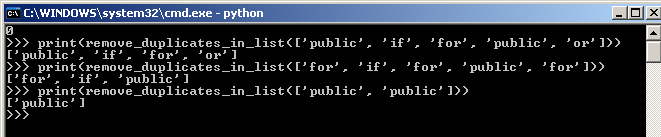
def remove_duplicates_in_list(sequence):
    # Thanks to Dave Kirby for this function taken from comments in 
    # http://www.peterbe.com/plog/uniqifiers-benchmark 
    seen = set()
    seen_add = seen.add
    return [x for x in sequence if x not in seen and not seen_add(x)]

Example:


# count_ocurrences_in_list function returns a new list of paired values 
# that contain the keyword and how many times it appeared in the code
# using the standard count method of the sequences types
def count_ocurrences_in_list(sequence):
    totals_by_word = []
    no_duplicates = remove_duplicates_in_list(sequence)
    for word in no_duplicates:
        totals_by_word.append((word,sequence.count(word)))
    return totals_by_word

Example:


# print_results function prints the given sequence to the console
# It displays the list of Keyword and Total Number of Keywords
def print_results(sequence):
    print('', end='\n')    
    for item in sequence:
        print('%s, %s' % (item[0], item[1]))    

Example:


# print_to_file function creates an output file and prints the given 
# sequence into it. 
# It writes the list of Keyword and Total Number of Keywords
def print_to_file(sequence, output):
    with open(output, mode='w', encoding='utf-8') as output_file:
        output_file.write('\n')
        for item in sequence:
            output_file.write('%s, %s\n' % (item[0], item[1]))

Example:

Output:

Opening CSV:


# Main function. The program's entry point.
def main(argv=None):
    # if command line arguments are not empty
    if argv is None:
        # assign them to the local sequence variable argv
        argv = sys.argv
    
    # validate the script was used correctly. 
    if len(argv) != 4:
        # Otherwise, print the usage message to the console
        print("usage: program language sourcefile outputfile")
        # and exit the script
        sys.exit()

Example:


# get command line arguments
    # parameter 2 should be the language of the source code you want to count
    programming_language = sys.argv[1]    
    # parameter 3 should be the file that contains the source code you want to count
    source_file = sys.argv[2]    
    # parameter 4 should be the file that will contain the counting results
    output_file = sys.argv[3]     
    # get the list of reserved words for the given programming language
    language_keywords = get_language_keywords(programming_language)
    # get the single line comment character for the given programming language
    comment_character = get_line_comment_char(programming_language)

Example:
Here I added some print() and exit() to stop execution of the script


# define a variable that will hold the total number of keywords found in the file
    total_keywords_found = 0
    # define a list that will store all valid language keywords found in the file
    list_of_keywords_found = []

line_number = 0
    # open a file as read only (default mode)
    with open(source_file, encoding='utf-8') as source_code:
        # navigate through the lines of the file
        for line in source_code:
            # get the line number. Used only for console display purposes
            line_number += 1

Example:
The following line adds the line number to the beginning of the line being read
print('{:>4} {}'.format(line_number, line.rstrip()), end='\n')


# remove line comment if there is one based on the 
            # language's single line comment character  
            comment_idx = line.find(comment_character)
            if comment_idx >= 0:
                line = line[0:comment_idx]

Example:


# remove special characters from remaining text in line 
            # (operators and open-close characters)
            line = remove_special_characters(line)
            # create a list with all remaining words in the line
            words = line.split()

Example:


# navigate through the words of the sequence
            for word in words:
                # if the current word is a valid keyword for the 
                # given language
                if is_keyword(word, language_keywords):                    
                    # add to the list of 
                    # "total keywords found in the source code" the word
                    list_of_keywords_found.append(word)
                    # increment the number of total words found 
                    # in the source code
                    total_keywords_found = total_keywords_found + 1

Example:


# define a list that will store all paired 
    # values (keyword and total ocurrences of that keyword)
    totals_to_output = []    
    # insert first pair of values as the first element of the list, 
    # that is the Programming Language and the Total Keywords found
    totals_to_output.append((programming_language.capitalize(),str(total_keywords_found)))
    # insert all other pairs of values (keyword and total ocurrences 
    # of that keyword) found on the source code
    totals_to_output.extend(count_ocurrences_in_list(list_of_keywords_found))

Example:


# print the results to the console
    print_results(totals_to_output)
    # print the results to the output file
    print_to_file(totals_to_output, output_file)

# run the program
if __name__ == "__main__":    
    main()

Example:


Using the Script

How to use is was already shown in the step by step example above, but here below I just show you how I did the counting for my previous post "Keywords in source code Round 2"

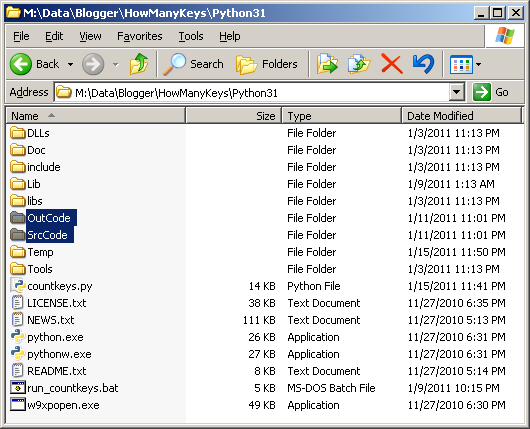
First I created 2 folders:
1. SrcCode
2. OutCode


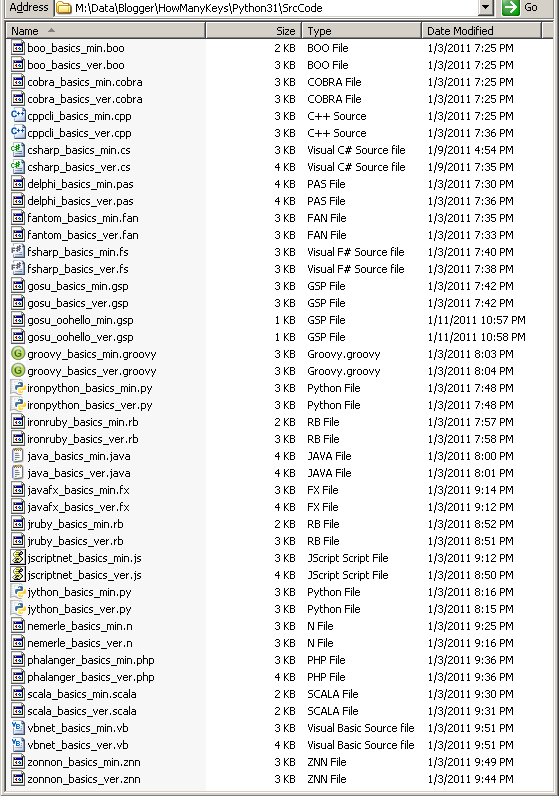
Then, I added all the source code files I wanted to count from into the SrcCode folder.


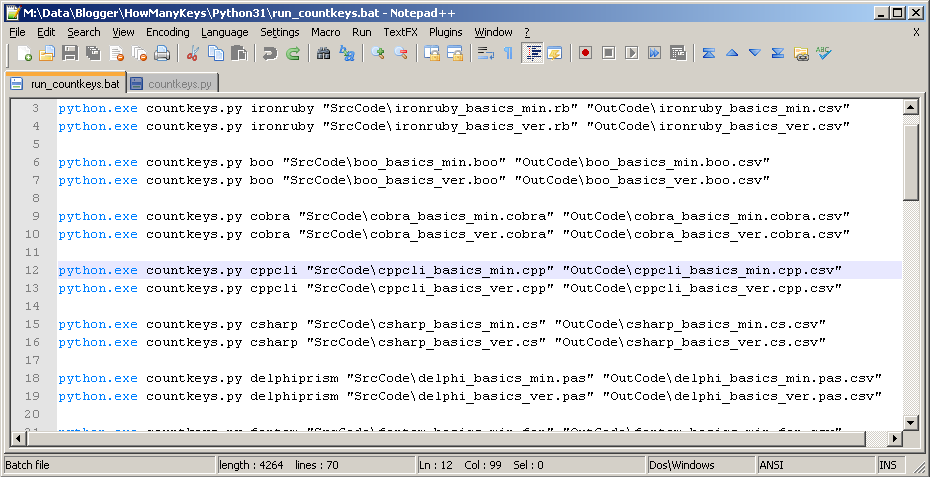
Next step was to create a batch file that runs the python script for all the files in the SrcCode folder.


And ran it


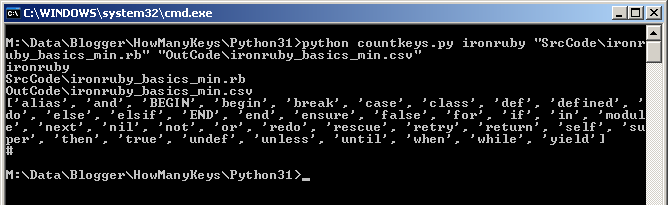
Console Output


Files Output in folder OutCode


Et Voilà! I then started merging together the results and did the graphs.

Hope this script works for you or at least shows you some cool python features :)


Final Script

Just don't forget to add the language keywords! take them from the Keywords Page.
Example:
keywords = 'public private static internal for if else while switch'

import sys

def get_line_comment_char(language):
    language = language.lower()    
    if language in ('c#', 'csharp', 'cpp', 'cppcli', 'c++', 'c++cli', 'f#', 
                    'fsharp', 'boo', 'phalanger', 'php', 'delphiprism', 'delphi', 
                    'nemerle', 'groovy', 'java', 'fantom', 'fan', 'jscript', 
                    'jscriptnet', 'scala', 'javafx', 'javafxscript', 'gosu'):
        return '//'
    elif language in ('vb', 'vbnet', 'visualbasic'):
        return '\''
    elif language in ('jython', 'ironpython', 'python', 'jruby', 'ironruby', 
                    'ruby', 'cobra'):
        return '#'        
    elif language in ('zonnon'):
        return '(*'
    return None

def get_language_keywords(language):
    language = language.lower()    
    if language == 'c#' or language == 'csharp':
        keywords = '' 
    elif language == 'vb' or language == 'vbnet' 
        or language == 'visualbasic':        
        keywords = '' 
    elif language == 'cpp' or language == 'cppcli' 
        or language == 'c++' or language == 'c++cli':
        keywords = '' 
    elif language == "f#" or language == "fsharp":        
        keywords = '' 
    elif language == "boo":
        keywords = '' 
    elif language == 'phalanger' or language == 'php':
        keywords = '' 
    elif language == 'jython' or language == 'ironpython' 
        or language == 'python':        
        keywords = '' 
    elif language == 'jruby' or language == 'ironruby' 
        or language == 'ruby':
        keywords = '' 
    elif language == 'delphiprism' or language == 'delphi':
        keywords = '' 
    elif language == 'zonnon':
        keywords = '' 
    elif language == 'nemerle':
        keywords = '' 
    elif language == 'groovy':
        keywords = '' 
    elif language == 'java':
        keywords = '' 
    elif language == 'cobra':
        keywords = '' 
    elif language == 'fantom' or language == 'fan':
        keywords = '' 
    elif language == 'jscript' or language == 'jscriptnet':
        keywords = '' 
    elif language == 'scala':
        keywords = '' 
    elif language == 'javafx' or language == 'javafxscript':
        keywords = '' 
    elif language == 'gosu':
        keywords = '' 
    else:
        keywords = ''
    return keywords.split()

def is_keyword(key, language_keys):    
    if key in language_keys:
        return True
    return False

def remove_special_characters(text):
    special_characters = ('(','[','{','}',']',')','+','-','*','/','=','^','&',
                        '%','$','#','@','!','~','\'','\"', '?', '>', '<', ':', 
                        ';', ',', '.')
    for character in special_characters:
        text = text.replace(character, ' ')
    return text

def remove_duplicates_in_list(sequence):
    seen = set()
    seen_add = seen.add
    return [x for x in sequence if x not in seen and not seen_add(x)]

def count_ocurrences_in_list(sequence):
    totals_by_word = []
    no_duplicates = remove_duplicates_in_list(sequence)
    for word in no_duplicates:
        totals_by_word.append((word,sequence.count(word)))
    return totals_by_word

def print_results(sequence):
    print('', end='\n')    
    for item in sequence:
        print('%s, %s' % (item[0], item[1]))    

def print_to_file(sequence, output):
    with open(output, mode='w', encoding='utf-8') as output_file:
        output_file.write('\n')
        for item in sequence:
            output_file.write('%s, %s\n' % (item[0], item[1]))

def main(argv=None):
    if argv is None:
        argv = sys.argv
    
    if len(argv) != 4:
        print("usage: program language sourcefile outputfile")
        sys.exit()

    programming_language = sys.argv[1]    
    source_file = sys.argv[2]    
    output_file = sys.argv[3]     
    
    language_keywords = get_language_keywords(programming_language)
    comment_character = get_line_comment_char(programming_language)
    
    total_keywords_found = 0
    list_of_keywords_found = []
    
    line_number = 0
    with open(source_file, encoding='utf-8') as source_code:
        for line in source_code:
            line_number += 1
            comment_idx = line.find(comment_character)
            if comment_idx >= 0:
                line = line[0:comment_idx]
            line = remove_special_characters(line)
            words = line.split()
            for word in words:
                if is_keyword(word, language_keywords):                    
                    list_of_keywords_found.append(word)
                    total_keywords_found = total_keywords_found + 1

    totals_to_output = []    
    totals_to_output.append((programming_language.capitalize(),str(total_keywords_found)))
    totals_to_output.extend(count_ocurrences_in_list(list_of_keywords_found))
    
    print_results(totals_to_output)
    print_to_file(totals_to_output, output_file)
    
if __name__ == "__main__":    
    main()

Saturday, October 30, 2010

Jython - Basics by Example


Continue with the Basics by Example; today's version of the post written in Jython Enjoy!

You can copy and paste the code below in your favorite IDE/Editor and start playing and learning with it. This little "working" program will teach you the basics of the Programming Language.

There are some "comments" on the code added just to tell you what are or how are some features called. In case you want to review the theory, you can read my previous post, where I give a definition of each of the concepts mentioned on the code. You can find it here: http://carlosqt.blogspot.com/2010/08/new-series-languages-basics-by-example.html 


Greetings Program - Verbose
# Jython Basics  
import java
from java.util import GregorianCalendar, Calendar, Scanner
from java.lang import System
  
class Greet(object):  
    # Fields of Attributes  
    __message = ''  
    __name = ''    
    __loopMessage = 0  
    # Properties   
    def getMessage(self):   
        return self.__message  
    def setMessage(self, value):   
        self.__message = self.__capitalize(value)  
    Message = property(getMessage, setMessage)  
    def getName(self):   
        return self.__name  
    def setName(self, value):   
        self.__name = self.__capitalize(value)  
    Name = property(getName, setName)  
    def getLoopMessage(self):   
        return self.__loopMessage  
    def setLoopMessage(self, value):   
        self.__loopMessage = value  
    LoopMessage = property(getLoopMessage, setLoopMessage)  
    # Constructor or Initializer Method  
    def __init__(self):    
        self.__message = ''    
        self.__name = ''    
        self.__loopMessage = 0  
    # Overloaded Constructor    
    # No Overloaded Constructors Support in Python  
    # Method 1  
    def __capitalize(self, val):  
        # "if-then-else" statement    
        if len(val) >= 1:    
            return val.capitalize()  
        else:    
            return ""  
    # Method 2    
    def salute(self):    
    # "for" statement  
        for i in range(0, self.__loopMessage):  
            print self.__message, self.__name + '!'  
    # Overloaded Method  
    # No Overloaded Methods Support in Python. New methods instead.  
    # Method 2.1    
    def salute21(self, message, name, loopMessage):  
        # "while" statement  
        i = 0  
        while i < loopMessage:    
            print self.__capitalize(message), self.__capitalize(name) + '!'     
            i = i + 1  
    # Method 2.2  
    def salute22(self, name):    
        # "switch/case" statement is not supported      
        # so I'm using if then else if...   
        dtNow = GregorianCalendar()
        hh = dtNow.get(Calendar.HOUR_OF_DAY)
        if hh in range(6,12):      
            self.__message = "good morning,"      
        elif hh in range(12,18):      
            self.__message = "good evening,"      
        elif hh in range(18,23):      
            self.__message = "good afternoon,"      
        elif hh == 23 or hh in range(0,6):      
            self.__message = "good night,"    
        else:    
            self.__message = "huh?"    
        print self.__capitalize(self.__message), self.__capitalize(name) + '!'  
  
# Console Program  
def main():  
    # Define variable object of type Greet  
    # Instantiate Greet. Call Constructor  
    g = Greet()    
    # Call Set Properties  
    g.Message = "hello"    
    g.Name = "world"    
    g.LoopMessage = 5   
    # Call Method 2    
    g.salute()  
    # Call Method 2.1 and Get Properties    
    g.salute21(g.Message, "jython", g.LoopMessage)  
    # Call Method 2.2    
    g.salute22("carlos")    
    # Stop and exit    
    print "Press any key to exit..."    
    sin = Scanner(System.in)  
    line = sin.nextLine()  
    sin.close()  

main()

Greetings Program - Minimal
# Jython Basics  
from java.util import GregorianCalendar, Calendar, Scanner
from java.lang import System
  
class Greet(object):  
    # Fields of Attributes  
    __message = ''  
    __name = ''    
    __loopMessage = 0  
    # Properties   
    def getMessage(self):   
        return self.__message  
    def setMessage(self, value):   
        self.__message = self.__capitalize(value)  
    Message = property(getMessage, setMessage)  
    def getName(self):   
        return self.__name  
    def setName(self, value):   
        self.__name = self.__capitalize(value)  
    Name = property(getName, setName)  
    def getLoopMessage(self):   
        return self.__loopMessage  
    def setLoopMessage(self, value):   
        self.__loopMessage = value  
    LoopMessage = property(getLoopMessage, setLoopMessage)  
    # Constructor or Initializer Method  
    def __init__(self):    
        self.__message = ''    
        self.__name = ''    
        self.__loopMessage = 0  
    # Overloaded Constructor    
    # No Overloaded Constructors Support in Python  
    # Method 1  
    def __capitalize(self, val):  
        # "if-then-else" statement    
        if len(val) >= 1:    
            return val.capitalize()  
        else:    
            return ""  
    # Method 2    
    def salute(self):    
        # "for" statement  
        for i in range(0, self.__loopMessage):  
            print self.__message, self.__name + '!'  
    # Overloaded Method  
    # No Overloaded Methods Support in Python. New methods instead.  
    # Method 2.1    
    def salute21(self, message, name, loopMessage):  
        # "while" statement  
        i = 0  
        while i < loopMessage:    
            print self.__capitalize(message), self.__capitalize(name) + '!'     
            i = i + 1  
    # Method 2.2  
    def salute22(self, name):    
        # "switch/case" statement is not supported      
        # so I'm using if then else if...   
        dtNow = GregorianCalendar()
        hh = dtNow.get(Calendar.HOUR_OF_DAY)
        if hh in range(6,12):      
            self.__message = "good morning,"      
        elif hh in range(12,18):      
            self.__message = "good evening,"      
        elif hh in range(18,23):      
            self.__message = "good afternoon,"      
        elif hh == 23 or hh in range(0,6):      
            self.__message = "good night,"  
        else:    
            self.__message = "huh?"    
        print self.__capitalize(self.__message), self.__capitalize(name) + '!'  
  
# Console Program  
# Define variable object of type Greet  
# Instantiate Greet. Call Constructor  
g = Greet()    
# Call Set Properties  
g.Message = "hello"    
g.Name = "world"    
g.LoopMessage = 5   
# Call Method 2  
g.salute()  
# Call Method 2.1 and Get Properties    
g.salute21(g.Message, "jython", g.LoopMessage)  
# Call Method 2.2    
g.salute22("carlos")  
# Stop and exit    
print "Press any key to exit..."    
sin = Scanner(System.in)  
line = sin.nextLine()  
sin.close()


And the Output is:


Private Fields and Methods in Jython

"There is limited support for class-private identifiers. Any identifier of the form __spam (at least two leading underscores, at most one trailing underscore) is textually replaced with _classname__spam, where classname is the current class name with leading underscore(s) stripped. This mangling is done without regard to the syntactic position of the identifier, so it can be used to define class-private instance and class variables, methods, variables stored in globals, and even variables stored in instances. private to this class on instances of other classes.

Name mangling is intended to give classes an easy way to define 'private' instance variables and methods, without having to worry about instance variables defined by derived classes, or mucking with instance variables by code outside the class. Note that the mangling rules are designed mostly to avoid accidents; it still is possible for a determined soul to access or modify a variable that is considered private. This can even be useful in special circumstances, such as in the debugger, and that's one reason why this loophole is not closed. (Buglet: derivation of a class with the same name as the base class makes use of private variables of the base class possible.)". Taken from: "http://docs.python.org/release/2.5.2/tut/node11.html#SECTION0011600000000000000000"

print 'Private Access Modifier Example:'  
class Greet(object):  
    # Fields of Attributes  
    __message = ''  
    __name = ''    
    __loopMessage = 0      
    # Constructor or Initializer Method  
    def __init__(self):    
        self.__message = ''    
        self.__name = ''    
        self.__loopMessage = 0   
    # Private Method  
    def __capitalize(self, val):  
        if len(val) >= 1:    
            return val.capitalize()  
        else:    
            return ""  
    # Public Method  
    def Salute(self):         
        for i in range(0, self.__loopMessage):
            print self.__message, self.__name + '!'
  
g = Greet()    
# publicly accessing private fields (_classname__fieldname)  
g._Greet__message = "hello"    
g._Greet__name = "world"    
g._Greet__loopMessage = 5   
# Call Public Method  
g.Salute()  
# Call Private Method (_classname__methodname)  
print g._Greet__capitalize('capitalized!')

Where to define Class Fields/Attributes in Jython

print ''  
print 'Class Attributes Example:'  
class ClassAttributes(object):  
    # You do not need to explicitly add the Fields/Attributes as shown below within the class:  
    # message = ''  
    # name = ''    
    # loopMessage = 0      
    # because they are added to the class as Fields/Attributes the first time they appear in   
    # your code. For example, here below, in the Initialize method,   
    # we have 2 fields (name and message)  
    def __init__(self):    
        self.message = '' # class field  
        self.name = ''  # class field  
    # and one more within a public method (loopMessage)  
    def Salute(self):  
        self.loopMessage = 0 # class field  
        localtest = 0   # local variable  
  
# Then, you can access each of them as you normally do:  
f = ClassAttributes()  
f.message = 'Hello'  
f.name = 'World'  
f.loopMessage = 5  
  
print f.message, f.name, f.loopMessage

Overloading Constructor and Methods in Jython

Python does not support Overloading Methods nor Constructors, instead, you can define one method with variable arguments and code the if-elif code to handle both(or multiple) cases yourself.

print ''  
print 'Overloaded-like Constructor and Method Example:'  
  
class Overloading(object):  
    # Constructor with variable arguments  
    def __init__(self, *args):  
        # if args list/sequence is not empty we use the arguments,   
        # otherwise we use the class fields
        if args:     
            self.message = args[0]  
            self.name = args[1]  
            self.loopMessage = args[2]  
        else:
            self.message = 'empty_message'  
            self.name = 'empty_name'  
            self.loopMessage = 2   
    # Method  with variable arguments  
    def Salute(self, *args):  
        # if args list/sequence is not empty we use the arguments,   
        # otherwise we use the class fields  
        if args:
            for i in range(0, args[2]):
                print args[0], args[1] + '!'  
        else:  
            for i in range(0, self.loopMessage):  
                print self.message, self.name + '!'     

# and now we use the "overloaded-like" constructor and method  
# calling constructor without parameters  
o1 = Overloading()  
# calling method without parameters  
o1.Salute()  
# calling method with parameters  
o1.Salute('Hello', 'Jython', 3)  
# calling constructor with with parameters  
o2 = Overloading('Hello', 'Carlos', 2)  
# calling method without parameters  
o2.Salute()


And the Output is: